Telegram and Discord Forwarding Routes: Which Tool to Use
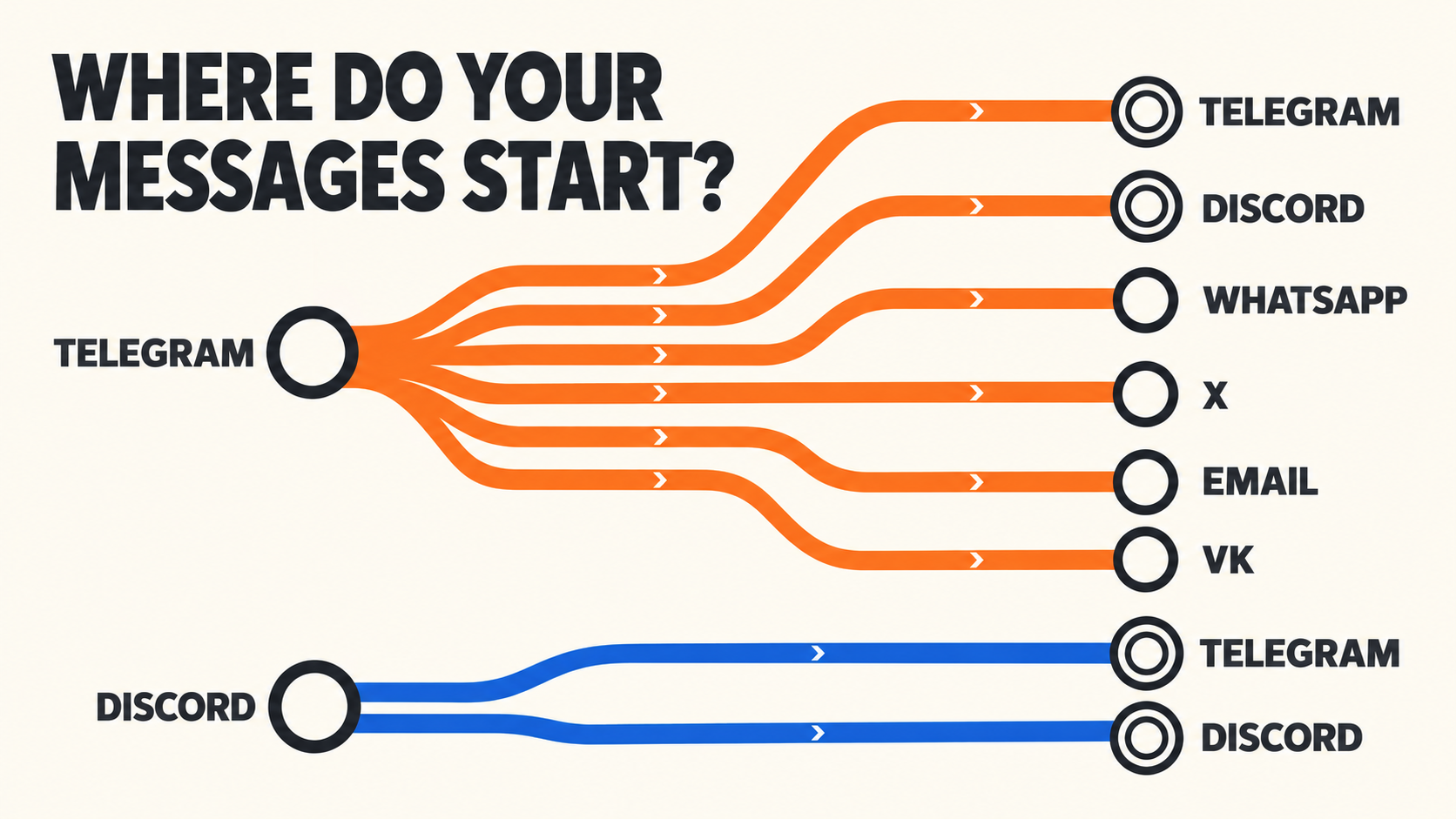
If your messages start in Telegram, use RedFox Auto Forward Telegram (@AutoForwardNew_Bot): it routes Telegram posts to another Telegram chat, Discord, WhatsApp, X, email or VK. If they start in Discord, use RedFox Auto Forward Discord To Telegram (D2T), which forwards a Discord channel to Telegram or to another Discord channel. They are separate products with separate accounts and plans, so the first decision is simply where your messages begin.
RedFox is the team behind both tools. The previous bot has moved to @AutoForwardNew_Bot; use this current handle to access RedFox Auto Forward Telegram. Auto-Bot.io is a separate editorial publisher and does not develop or operate either bot. The requirements below were checked against RedFox's documentation on October 21, 2026; this page maps those guides and is not a new delivery test.
The route map at a glance
Find your direction, then follow the row. The source is where messages are written; the destination is where copies appear.
| Direction | RedFox tool | How the source is read | What the destination needs | Add-on / plan note | Setup guide | If it fails |
|---|---|---|---|---|---|---|
| Telegram → Telegram | Auto Forward Telegram, regular task | Your connected Telegram account (joined to any private source) | A target chat where the task's sender, your account or a bot, can post | Free: 3 sources / 3 targets | Setup guide | Not-forwarding checklist |
| Telegram → Discord | Auto Forward Telegram, Publish Task | Your connected Telegram account | Discord bot token, the bot in the server, numeric Channel ID | External Publish add-on | Discord guide | Discord fixes |
| Telegram → WhatsApp | Auto Forward Telegram, Publish Task | Your connected Telegram account | WhatsApp linked by QR code; one Contact, Group or Newsletter per task | External Publish add-on | WhatsApp guide | WhatsApp fixes |
| Telegram → X | Auto Forward Telegram, Publish Task | Your connected Telegram account | An X App with Read and write, plus four OAuth 1.0 credentials | External Publish add-on; X API access is set by X | X guide | X fixes |
| Telegram → Email | Auto Forward Telegram, Publish Task | Your connected Telegram account | A Gmail (App Password) or SMTP sender and a recipient address | The guide lists no add-on; check the Publish screen | RedFox email guide | Same guide, Troubleshooting section |
| Telegram → VK | Auto Forward Telegram, Publish Task | Your connected Telegram account | A VK connection; a Profile or Community/Page URL or ID | Check the access shown in your account | VK guide | VK route checks |
| Discord → Telegram | D2T task | A Discord bot connected in D2T (see the connection note below) | Your Telegram bot as an admin; Telegram chat ID; optional topic ID | Separate D2T plan; topic forwarding is listed under Platinum | D2T task setup | Wrong-topic fix |
| Discord → Discord | D2T task | D2T's Discord bot with View Channel and Read Message History | The same bot in the destination with Send Messages, Embed Links and Attach Files | Separate D2T plan | Partner feed guide | D2T troubleshooting order |
Two rules run through the documented Publish routes. The Discord, WhatsApp, X and email guides all say a Publish Task handles new messages posted after the task is created; older Telegram posts are not reposted. The Discord, WhatsApp and X guides also list an active External Publish add-on as a prerequisite.
Telegram-source routes: RedFox Auto Forward Telegram
All six routes start the same way: sign in on the Web app, Android, iOS or the Telegram bot, and connect your Telegram account. That account reads the source, so you do not add a bot or need admin rights in the source chat; for a private channel, it must already be a member. The Web and mobile apps offer the fuller management screens, and an active task runs in RedFox's cloud, so your device does not need to stay online.
Telegram → Telegram uses a regular forwarding task. The other five routes use Publish. The Discord, WhatsApp, X and email guides describe a four-step Publish Task wizard: Provider, Connection, Source and recipient, Review. Connect the destination account before selecting it in the task; follow the VK guide for its Profile or Community/Page destination flow.
Telegram → Telegram
Answer: create a forwarding task that pairs a source chat (a channel, group, user or bot) with a target chat. New posts are then copied automatically, with optional filters, topic mapping and scheduling.
- A connected Telegram account that can read the source.
- A target chat where the task's sender can post. The sender can be your own account or one or more Telegram bots.
- For forum groups: Topics enabled in the target, plus permission to create and rename topics there if you use Topic Sync.
- Permission to republish the content to that audience.
Example: a game studio forwards the Patch notes topic of its staff group Studio Ops into the Updates topic of its public group Player Hub, using manual topic mapping so the staff group's other topics stay private.
Key limit: the Free plan covers 3 sources and 3 targets. A regular task routes new posts; copying existing history is a separate Clone flow. Topic deletion is not synchronized, so deleting a source topic leaves the target topic in place.
Go next: complete setup guide, private-channel guide, topic routing guide; RedFox docs: How to Create a Task and Setup Topics.
Telegram → Discord
Answer: create a Discord Publish Task. A Discord bot that you own posts new messages from one or more Telegram sources into one or more Discord text channels, identified by Channel ID. The current flow uses a bot, not a webhook.
- An active External Publish add-on.
- A bot from the Discord Developer Portal, with its token pasted as
Bot YOUR_DISCORD_BOT_TOKEN. - The bot installed in your server with the
botscope and at least View Channels and Send Messages; add Embed Links and Attach Files for media and rich links. - Each destination's numeric Channel ID: enable Developer Mode, then use Copy Channel ID.
Example: the Telegram channel Patch Radar publishes to #announcements and #patch-notes in the Discord server Guild Hall, both added to one task with Add Discord Channel.
Key limit: only messages posted after the task is created are published. A channel-level permission override can block the bot even when its server role looks correct, so check each destination channel.
Go next: Telegram to Discord setup, Telegram to Discord not working, RedFox's Discord publishing guide.
Telegram → WhatsApp
Answer: link WhatsApp by scanning a QR code, choose one Contact, Group or Newsletter (RedFox's label for a WhatsApp Channel), and create a Publish Task. No Phone number ID or access token is needed.
- An active External Publish add-on.
- WhatsApp on your primary phone: Linked devices → Link a device, then scan the code shown in RedFox. Codes expire; use Retry or Reconnect for a new one.
- Permission to send to the chosen contact, group or channel.
- One WhatsApp connection per account; an existing one is reused.
Example: the Telegram channel Corner Bakery Deals publishes to the WhatsApp group Bakery Regulars. Reaching the bakery's WhatsApp Channel too needs a second task, because each task stores one destination.
Key limits: one destination per task, new messages only. Auto-Bot.io's September 2026 supported-media review identified photo, video, audio, voice, document and sticker delivery paths, with representative controlled readbacks; this is not a text/caption-only route. Test the files and destination types your workflow needs. The first-party setup guide's older text-only wording is stale, and its edit/delete instructions conflict, so verify correction behavior separately rather than assuming every later change reaches WhatsApp.
Go next: Telegram to WhatsApp setup, Contact vs Group vs Channel, Telegram to WhatsApp not working, RedFox's WhatsApp publishing guide.
Telegram → X
Answer: connect your X account with four OAuth 1.0 credentials from one X App, choose the Telegram channels or groups to watch, and create a Publish Task. The connected X account is the destination.
- An active External Publish add-on.
- An X App set to Read and write before you generate the Access Token.
- Consumer Key, Consumer Secret, Access Token and Access Token Secret from that App, for the posting account. A Bearer Token, Client ID or Secret, or OAuth 2.0 token will not work.
- API access on X's side; X sets API availability and charges separately from RedFox.
Example: the Telegram channel Release Radar publishes to the company's X account Acme App Updates, with a fixed footer added under Advanced Settings.
Key limit: the RedFox add-on and your X API access are separate dependencies; if X reports no credits or API access, reconnecting the RedFox task will not fix it. Edits and deletions are processed only when you enable those options.
Go next: Telegram to X setup, Telegram to X not working, RedFox's X credentials guide.
Telegram → Email
Answer: connect a sending account (Gmail with an App Password, or custom SMTP), choose your Telegram sources, enter a recipient address and create an Email Publish Task.
- Gmail: 2-Step Verification on and a Gmail App Password, not your normal password.
- Custom SMTP: a public hostname, with port 465 and TLS or port 587 and STARTTLS.
- A recipient address, separate from the sending account.
- The email guide's prerequisites do not list the External Publish add-on; if Publish shows an unlock prompt, complete it first.
Example: the Telegram group Ops Alerts sends through [email protected] to [email protected], with the subject set to the task label so mail rules can sort it.
Key limit: attachments are limited to 8 MiB per file and 20 MiB per source message. Only new messages are sent, and edits and deletes are not mirrored.
Go next: RedFox's email publishing guide covers setup and troubleshooting. To decide which audience gets which version of an update, read Telegram cross-platform publishing.
Telegram → VK
Answer: create a Publish Task with VK as the platform, choose VK Profile or VK Community/Page, paste the URL or ID, and check the destination preview before saving.
- A VK connection added through Add Platform Account, with the right to publish to the destination.
- The correct destination type: a profile keeps a positive user ID; a community or page is converted to a negative community ID.
- The VK guide states no add-on or plan conditions, so check the access shown in your account.
Example: the Telegram channel City Pulse publishes to a newsroom's VK community. In the guide's own sample, https://vk.com/public216874049 becomes the target -216874049.
Key limit: the Profile or Community/Page choice decides where posts appear, and invalid input must be corrected before the task saves.
Go next: Telegram to VK setup, RedFox's VK publishing guide.
Starting from Telegram? Review RedFox Auto Forward Telegram. The Free plan covers 3 sources and 3 targets, and eligible new users can try Platinum free for 5 days with full features.
Discord-source routes: RedFox Auto Forward Discord To Telegram (D2T)
D2T has its own account, documentation and apps: the web dashboard, Android and iOS. Its FAQ says you do not need to keep your internet connection on while tasks run.
Connection note: D2T's bot guides have you create a Discord bot, invite it to the server and connect its token, and state that this setup is required to connect Discord servers to Telegram. D2T's account guide still shows a Config Token step that asks for a Discord user token. Discord's policy says automating normal user accounts outside its OAuth2/bot API is forbidden and can result in account termination. Use the bot connection, and ask RedFox support (@redf0x1) if your screen only offers a user-token field.
Discord → Telegram
Answer: create a D2T task with a Discord Channel ID as the source and a Telegram chat ID as the target. Your Telegram bot posts the copies, optionally into a specific topic.
- A D2T account with Discord connected (see the note above) and a Telegram bot token from @BotFather saved in D2T.
- That Telegram bot added to the target channel or group as an admin. The task guide also mentions @discordtotele_bot, so confirm which bot your account uses.
- The Discord Channel ID: type
/getidin the channel, or copy the channel link and take its last number. - The Telegram chat ID, for example from @FindMyIDs_Bot, and an optional Telegram Topic ID.
Example: #release-notices in the Discord server Studio Server forwards to the Telegram channel Studio News. A second task sends the same channel to the Updates topic of the group Studio Community.
Key limit: your Telegram bot must be an admin in the target, and the right group with the wrong topic ID still lands in the wrong place. D2T's plan table lists Support Forward Topic under Platinum, so check your plan if you need a topic destination.
Go next: D2T's Setup New Task and channel ID guides; for an existing route, use the wrong-topic fix.
Discord → Discord
Answer: D2T's Discord bot reads a source channel and reposts its messages into a destination channel, in the same server or a different one.
- A Discord bot token from the Developer Portal, connected in D2T.
- The bot invited to both servers, which requires owning the server or having Manage Server.
- Source: View Channel and Read Message History. Destination: Send Messages, Embed Links and Attach Files. Administrator is not required; D2T's guide calls it a security risk.
- A message link copied from the source channel, from which D2T extracts the server and channel IDs.
Example: #release-notes in Studio Server forwards to #partner-updates in Partner Guild, with a Whitelist so that only tagged announcements cross over.
Key limit: according to D2T's guide, thread messages outside the main channel are not captured, forum posts forward only their first post, voice messages and polls are not supported, stickers become placeholder text, and unsupported types are skipped without an error. Keep the receiving channel out of any return route so copies do not loop back.
Go next: Discord-to-Discord partner announcements, forwarded message not updating, D2T's Discord to Discord guide.
Starting from Discord? Explore D2T for Discord → Telegram and Discord → Discord routes, then check its plan page for the features your route needs.
Which direction do I need?
- Posts are written in a Telegram channel or group: Auto Forward Telegram. Use a regular task for another Telegram chat, or a Publish Task for Discord, WhatsApp, X, email or VK.
- Posts are written in Discord: D2T, for Discord → Telegram or Discord → Discord.
- Telegram and Discord in both directions: build two one-way routes, one in each product, and never use one route's destination as the other's source.
- Several destinations: a Discord Publish Task accepts several Channel IDs; WhatsApp needs one task per destination; D2T uses one task per Discord-to-Discord pair.
- Old posts, not just new ones: the Discord, WhatsApp, X and email Publish guides say these routes do not repost older messages. For Telegram → Telegram history, look at Clone.
- Another source platform, such as WhatsApp or X: the RedFox guides reviewed here document the eight directions above. Check current RedFox documentation or ask support about anything else.
Troubleshooting index by symptom
For the Discord, WhatsApp, X and email Publish routes, confirm that the task shows Running, then send a new plain-text message to a selected source after the task was created. Those guides say older messages are not automatically reposted. For the other routes, follow the route-specific checks below.
- Discord bot is Connected, but nothing appears: Telegram to Discord not working.
- WhatsApp QR code expired, or Reconnect required: Telegram to WhatsApp not working.
- Text reaches WhatsApp, but a photo, video or file does not: supported media.
- X account Connected but no post, or a credits error: Telegram to X not working.
- No email arrived: check Spam, the recipient, the App Password and attachment size in the email guide.
- VK post went to the wrong profile or community: VK route checks.
- Telegram → Telegram task stays silent: RedFox's not-forwarding checklist (filters, IDs, Debug Mode); for a private or protected source, protected forwarding not working.
- Discord → Telegram copies land in the wrong topic: right group, wrong topic.
- Discord → Telegram forwards nothing: D2T's not-forwarding guide, starting with filters and a clean test setup.
- Discord copy did not update after an edit: forwarded message not updating.
Plans and add-ons
RedFox Auto Forward Telegram's Free plan includes 3 sources and 3 targets. Eligible new users can try Platinum free for 5 days with full Platinum features. Paid plans are Gold at $49.99, Diamond at $79.99 and Platinum at $129.99 per year, or $4.99, $7.99 and $12.99 per month; see the official site for current terms.
Publish routes can need more than a plan. The Discord, WhatsApp and X guides require the External Publish add-on, and RedFox add-ons are unlocked with credits for a set duration, separately from the subscription. X bills its own API access. D2T has separate plans; check the D2T plan page before building a Discord-source route.
FAQ
Is Telegram → Discord the same product as Discord → Telegram?
No. Telegram → Discord is a Publish Task in RedFox Auto Forward Telegram. Discord → Telegram is a task in D2T, which has its own account, documentation and plans.
Can I forward both ways between Telegram and Discord?
Yes, with two one-way routes: Telegram → Discord in Auto Forward Telegram and Discord → Telegram in D2T. Keep each route's destination out of the other route's sources so a copy is not forwarded back.
Will messages from before the task was created be forwarded?
Not on the Discord, WhatsApp, X or email routes; their guides say tasks publish new messages only. For Telegram → Telegram history, Auto Forward Telegram has a separate Clone flow.
Do I need admin rights in the source?
For Telegram sources, no: your connected account reads the chat, so it only needs to be able to see it, which for a private channel means being a member. For Discord sources, the D2T bot must be invited to the server by its owner or someone with Manage Server.
Does my computer need to stay on?
No. Both products' FAQs say you do not need to keep your internet connection on, because the bot copies messages on its own.
Pick one route and test it
Start with one source and one destination, and send a harmless test message before adding filters or more destinations. If it fails, use the troubleshooting index instead of rebuilding the task.
For Telegram-source routes, review RedFox Auto Forward Telegram and open the exact bot at @AutoForwardNew_Bot: start on Free, or try Platinum free for 5 days if you are an eligible new user. For Discord-source routes, explore D2T and check its plan page before you build.
Starting From Telegram? Pick Your Route
Route Telegram posts to another chat, Discord, WhatsApp, X, email or VK. Free covers 3 sources and 3 targets; eligible new users can try Platinum free for 5 days.
Source-checked route requirements · Test one fresh message