BlogAutomation TipsHow to Auto-Forward a Private Telegram Channel Safely
Automation Tips

How to Auto-Forward a Private Telegram Channel Safely

A
Auto Bot Team
September 14, 202611 min read1 views
TelegramTutorialAuto-Forward
How to Auto-Forward a Private Telegram Channel Safely

Yes—you can auto-forward messages from a private Telegram channel with RedFox when the Telegram user account connected to the service has already joined that channel. That source access is only half of the setup: you also need an authorized destination, the correct source and target selected in the task, and a controlled test before you rely on the route.

Entity clarification: RedFox Auto Forward Messages is a Telegram forwarding service. Auto-Bot.io is an independent editorial website reviewing the service; it does not develop, operate, or represent RedFox.

Methodology: We reviewed RedFox product documentation and ran a controlled text-forwarding test on September 14, 2026. Product screens and access conditions can change, so confirm the interface you see before configuring a live route.

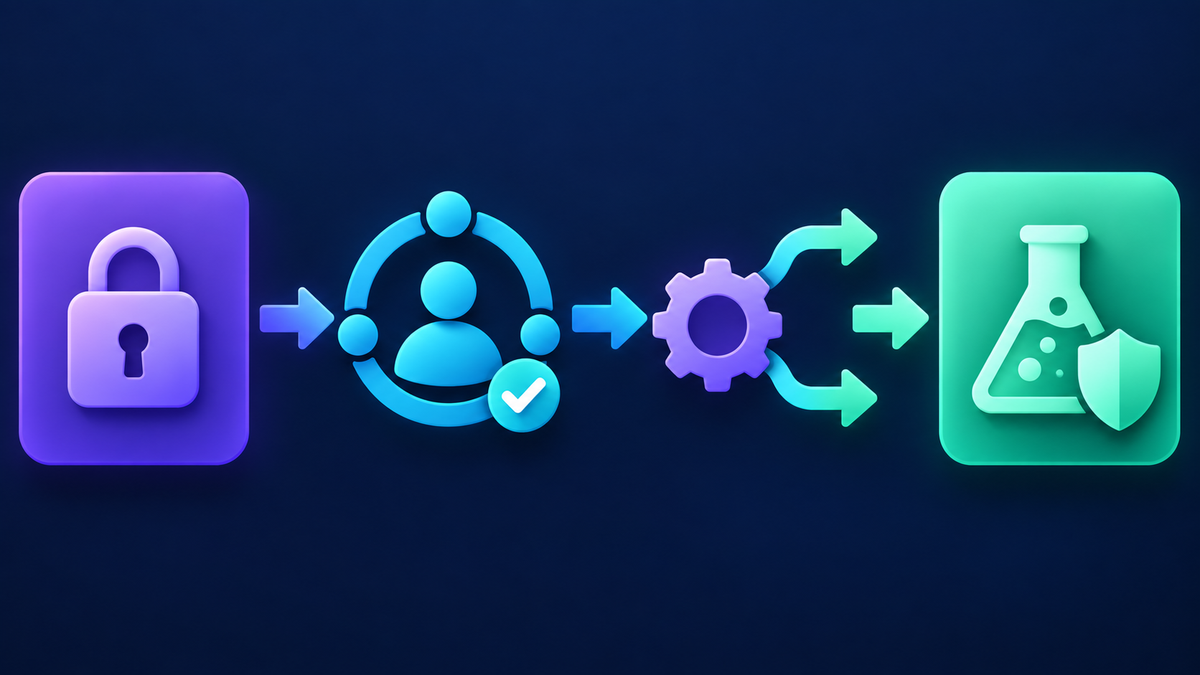
Conceptual private Telegram channel forwarding route with access and destination checks
A safe private-channel route has two gates: the connected user must see the source, and the chosen destination must be authorized and able to receive the test.

Key facts

  • Private source: RedFox's FAQ checked September 14, 2026 says the connected Telegram user must already have access to the channel.
  • Destination: Configure and authorize the destination separately from source access.
  • Observed text test: The controlled source and target both displayed the sample at 09:41 on September 14, 2026. This was one same-minute observation, not a performance benchmark.
  • Content rights: Membership does not automatically grant permission to republish channel content.
  • Evidence date: Documentation and product screens were checked on September 14, 2026.

Can you auto-forward from a private Telegram channel?

According to RedFox's private-channel FAQ, checked September 14, 2026, you can use a private channel as a source when your connected Telegram user account has joined it. This matters because a private channel is not discoverable in the same way as a public channel. In this documented setup, source selection is limited to chats available to the connected account.

This statement does not mean that any private channel can be copied. You cannot use this workflow to gain access to a channel you have not joined. Membership also does not automatically grant permission to republish paid, confidential, copyrighted, or otherwise restricted material. Use a source and destination that you are authorized to connect, and follow the source owner's rules and applicable rights.

In our September 14, 2026 verification, the RedFox product identified the service as RedFox Auto Forward Messages and the Telegram bot as @AutoForwardNew_Bot. Check the raw username and the full destination—https://t.me/AutoForwardNew_Bot—rather than relying on a display name or avatar alone.

Understand the private-source access model

The most common setup mistake is treating source access and destination delivery as one permission. They are separate questions:

Side of the routeWhat must be trueWhat it does not prove
Private sourceThe Telegram user account connected to RedFox has joined the source channel.That you may republish everything in the channel.
DestinationYou control or are authorized to use the chosen target, and the route can post there under the tested setup.That every message type or future message will deliver correctly.
Forwarding taskThe correct source, target, and task settings are selected.That filters, media, edits, or protected content will behave as assumed.

This is why the blanket instruction “add the service bot as an administrator in the private source” does not match the source model in RedFox's documentation checked September 14, 2026. That FAQ ties source access to the joined user account. The target still needs its own valid configuration, which you should verify with a test rather than infer.

Prepare the source, destination, and test

Use a small, reversible test before creating a production route. The example below is an instructional scenario, not a customer case study or measured product result.

Suppose an operations team has permission to receive updates from a private supplier channel. The operator has joined that channel with the Telegram account that will be connected to RedFox. Instead of targeting the team's live announcement channel immediately, the operator first chooses a private test group controlled by the team.

Prepare these four items:

  1. One eligible source: confirm that the connected Telegram account is already a member of the private channel.
  2. One controlled destination: use a private test group or channel that will not disturb customers, subscribers, or a paid community.
  3. Two disposable messages: prepare one plain-text message and one media message that contain no secrets, customer data, paid content, or real alerts.
  4. A pass definition: record what should arrive, where it should arrive, and whether text and media must remain attached.

Do not use a real trading signal, customer record, confidential update, or copyrighted paid post as your first test. A controlled sample lets you diagnose settings without creating a second rights or operational problem.

How to configure the private-channel route in RedFox

The steps below follow RedFox's account-connection guide and task-creation guide, both checked September 14, 2026. We also exercised the web interface that day with dedicated Demo chats. Interface labels may change; use the screen you see as the final authority.

  1. Connect the correct Telegram account. Open the RedFox app or web version and follow its Telegram verification flow. Use the account that has already joined the private source. Never share login codes or two-step verification passwords with another person.
  2. Open the Forwarding List. Choose Create Task + to begin a new route.
  3. Find the private source. On the source screen, choose Channel or inspect All, then select the intended private channel. Check the channel identity carefully when names look similar.
  4. Select the controlled destination. Choose the private test target you prepared, not the live customer-facing destination.
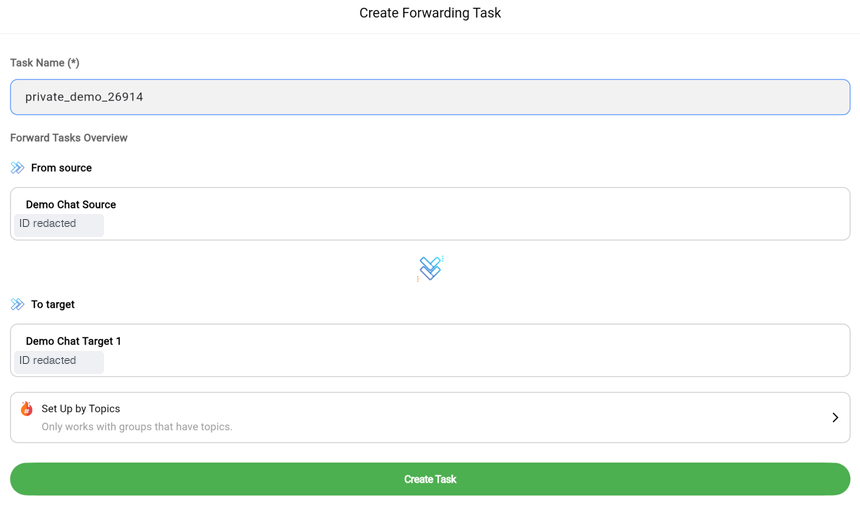
  5. Name and create the task. In the interface observed on September 14, 2026, the label had to be shorter than 20 characters, use letters or digits, allow only hyphens and underscores as special characters, and contain no spaces. Use a recognizable label that does not expose confidential information.
  6. Verify the route before adding advanced settings. Test the simplest forwarding path first. Add filters, transformations, scheduling, or other options only after the base route behaves as expected.
RedFox Create Forwarding Task screen with Demo Chat Source and Demo Chat Target 1 selected
RedFox web interface observed September 14, 2026, with a controlled Demo source and target selected. Numeric chat IDs are redacted.
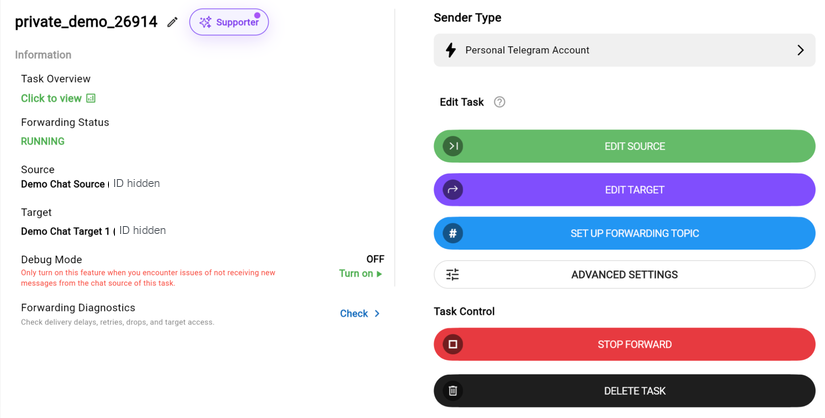
RedFox task detail showing a running Demo Chat Source to Demo Chat Target 1 route
After creation, the test task displayed RUNNING with the expected source and target. This status is configuration evidence; delivery was checked separately in Telegram.

If you joined the source recently and it does not appear, the official task guide says synchronization may be delayed. First verify that you selected the correct account and source type. Then inspect All. Use Reload once if the existing chat still is not displayed; the same guide warns against unnecessary reloads.

Test before using a live destination

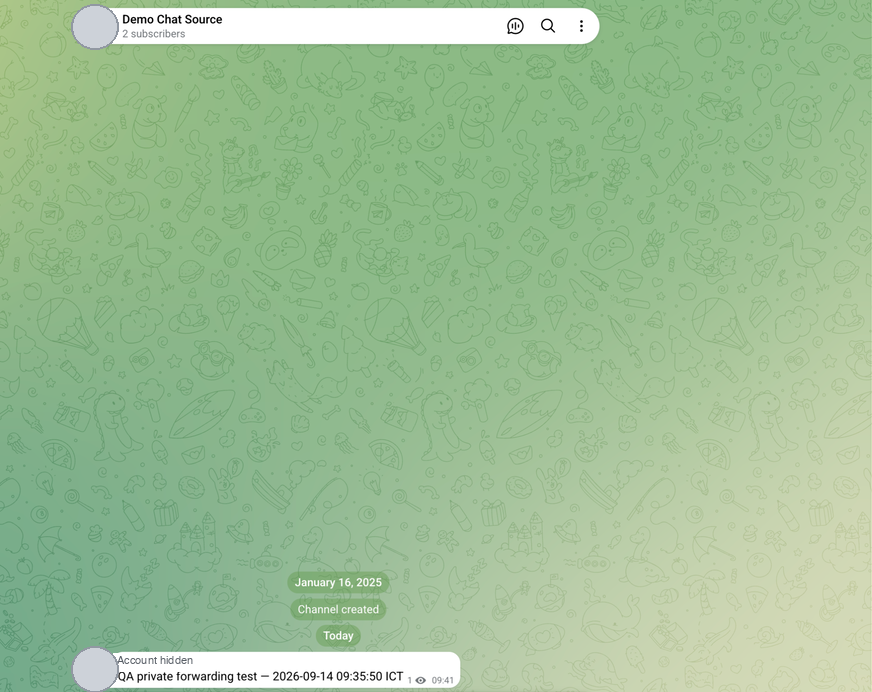
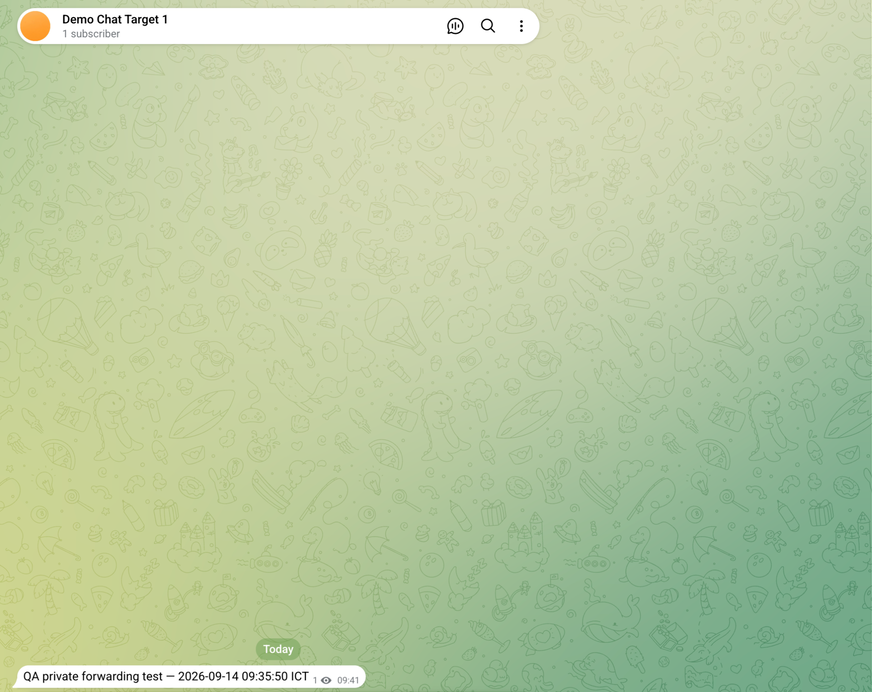
A “task created” message is not delivery evidence. In our controlled check, a plain-text sample sent from Demo Chat Source appeared in Demo Chat Target 1 during the same observed minute, with both Telegram UI timestamps showing 09:41. This is one observed text case, not a latency benchmark or service-level guarantee. Test every message type your workflow actually needs:

Test caseExpected resultEvidence to retain
Plain textThe complete sample arrives once in the intended test destination.Observed in our Demo route; both source and target displayed 09:41.
Media with captionThe required media and caption arrive in an acceptable form.Not covered by this text-only check; retain redacted screenshots, item count, and the observed caption when you test it.
Demo Chat Source showing the controlled QA text at 09:41
Source receipt: the controlled text sample in Demo Chat Source at 09:41. The Telegram sidebar is cropped out; sender/account labels and avatars are hidden.
Demo Chat Target 1 showing the same controlled QA text at 09:41
Target receipt: the same text in Demo Chat Target 1 at 09:41. The paired timestamps show same-minute delivery in this single observation.

If the route fails, pause it and change one thing at a time. Do not change the source, target, filters, and account connection together; that makes the next result impossible to diagnose. A successful test proves only what you observed for those messages, settings, chats, and time. It does not guarantee future delivery or every content type.

Once the controlled cases pass, recheck the intended live destination and its authorization before changing the task. Keep a clear rollback action—usually pausing the route or returning it to the controlled target—if the first real messages differ from the approved test.

Troubleshoot private Telegram channel forwarding

Observed problemCheck firstControlled next step
The private channel is not listedConfirm that the connected Telegram account has joined it.Check Channel and All; if it was joined recently, use Reload once as described in RedFox's task guide checked September 14, 2026.
A similarly named channel appearsVerify the exact source identity before selecting it.Return to the source selector and compare the chat details.
The task exists but nothing arrivesTask state, chosen source, chosen target, and destination ability.Send one plain disposable message with optional rules minimized.
Text arrives but media does notMessage-type filters and any content transformation.Test one media message after changing only the relevant setting.
The source restricts copying or redistributionSource rules, authorization, and Telegram behavior.Do not attempt to bypass the restriction; obtain permission or stop the route.

If a source remains unavailable after account membership, source-type, and documented reload checks, use the RedFox support path displayed in the product rather than repeatedly reconnecting or exposing account credentials.

When RedFox is a fit for private-channel forwarding

RedFox is a relevant option when the operator has legitimate access to a private Telegram source through their own joined account and needs a configurable route to an authorized destination. Its task guide checked September 14, 2026 exposes channels, groups, users, and bots as source/target categories and documents a task-based workflow.

That does not make it the right tool for unauthorized copying, bypassing content protection, or obtaining access to a channel you have not joined. It also does not remove the need to test message types and destination behavior. Treat documentation as the setup starting point and your controlled observations as the acceptance evidence for the specific route.

Based on the documentation reviewed and the controlled test described above, RedFox is suitable for workflows where the connected Telegram account already has legitimate access to the private source and the operator controls or is authorized to use the destination. Auto-Bot.io has no operational relationship with RedFox, and the same-minute observation is not a speed, reliability, security, or delivery benchmark.

Open the RedFox Auto Forward Messages bot verified on September 14, 2026, confirm the username @AutoForwardNew_Bot, and begin with the controlled test destination described above.

Frequently asked questions

Does the RedFox service bot need to be an admin in my private source?

The RedFox private-channel FAQ checked September 14, 2026 does not describe source access that way. It says private-channel forwarding is available when the connected Telegram user has joined the channel. Target-side configuration is separate and should be verified in the interface and with a controlled test.

Why is my newly joined private channel missing?

First confirm that you connected the same Telegram account that joined the channel and that you are looking under Channel or All. RedFox's task guide checked September 14, 2026 says recent chats may have a synchronization delay and recommends Reload when an existing chat is not displayed, while warning against unnecessary reloads.

Can I forward from a private channel I have not joined?

Not according to the RedFox FAQ checked September 14, 2026. The connected user must be joined on the private channel. Do not use forwarding tools to seek unauthorized access.

Does channel access mean I may republish its messages?

No. Technical access and permission to redistribute are different. Follow the source's rules, contractual terms, copyright, privacy expectations, and other applicable requirements. This article is operational guidance, not legal advice.

Which RedFox Telegram bot username was verified?

The username verified September 14, 2026 is @AutoForwardNew_Bot, available at https://t.me/AutoForwardNew_Bot. Check the raw username and URL rather than relying only on a display name or avatar.

Start with a controlled private-channel test

Confirm that the connected account has joined the private source, choose a destination you control, send disposable text and media, and keep the route out of a live audience until the required cases pass. Record the observed result instead of treating task creation as proof of delivery.

Start in @AutoForwardNew_Bot and verify the exact username before connecting your Telegram workflow.

Sources checked September 14, 2026: RedFox's private-channel FAQ, connection guide, and task-creation guide; plus a controlled interface test using dedicated Demo chats. The test task was stopped and deleted after verification.

Auto Forward Messages BotFree forever • 3 sources, 3 targets • Unlimited tasks

Put These Tips Into Action

Start automating now — available on Telegram Bot, Web, iOS & Android.

Get Started Free

Free forever • 3 sources, 3 targets • Unlimited tasks

A
Auto Bot Team
The Auto-Bot.io editorial team covering messaging platforms, social networks, automation software, MCP servers, browsers, and desktop apps.
Share this post
Back to Blog
Auto Forward Messages Bot

Start automating on any platform

Get Started Free