Telegram to WhatsApp Supported Media: What Transfers?
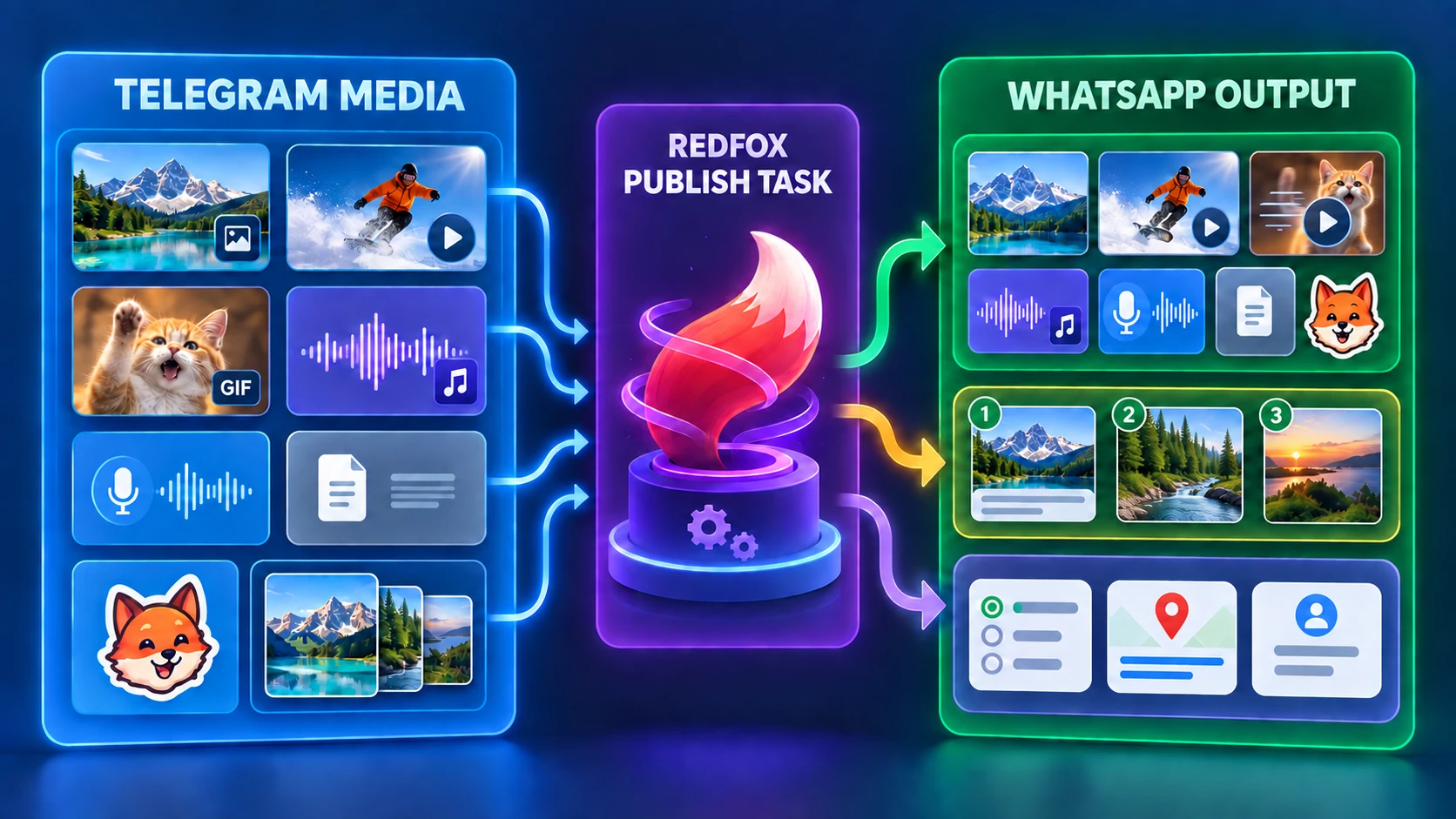
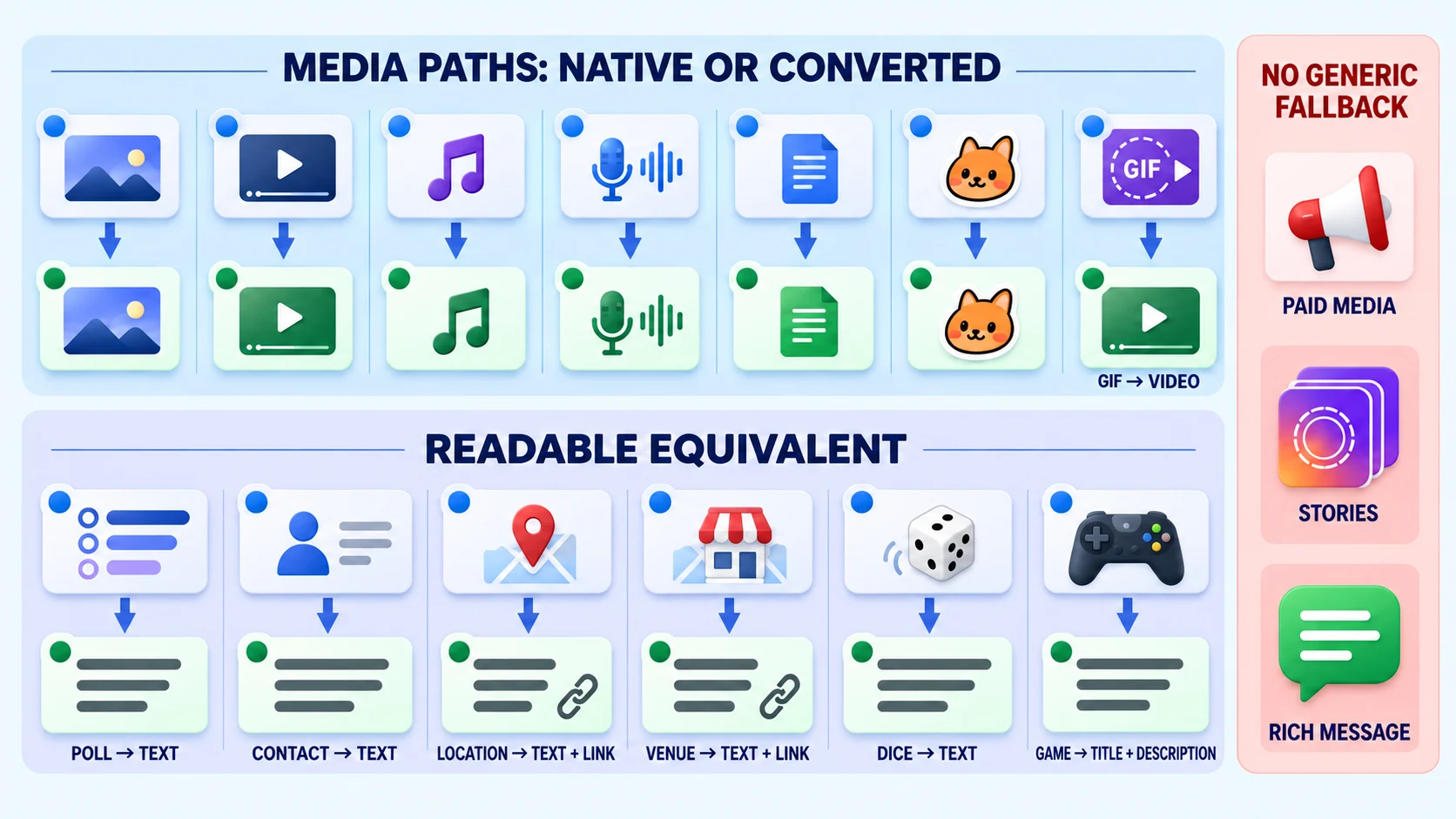
Telegram-to-WhatsApp supported media falls into three practical buckets in the RedFox version reviewed for this guide: media sent natively or after conversion, albums sent as ordered parts, and structured messages turned into readable text or links. Photos, videos, audio, voice messages, documents, and stickers use media paths; GIF/animation and video notes use a video representation; albums become ordered parts with the caption handled once; polls, contacts, locations, venues, dice, and games become readable equivalents.
Auto-Bot.io is an independent editorial site and does not develop or operate RedFox Auto Forward Telegram. The public RedFox setup guide is useful for QR and Publish Task setup, but its older text-only media wording is not used as evidence for the media map below.
Quick answer: what transfers?
- Text: sent as text. If a media item has a caption, the caption is attached to that publication part rather than sent as a second generic message.
- Photo, video, audio, voice, document, sticker: use dedicated media representations in the reviewed runtime.
- GIF/animation: converted to an MP4 representation and sent through the video path; do not promise that the result remains a GIF object.
- Video note: sent through the video path rather than preserved as Telegram's round video-note object.
- Album/media group: converted into ordered publication parts. The caption is handled once. This is not a native WhatsApp album claim.
- Poll, contact, location, venue, dice, game: rendered as readable text, with map links for locations and venues.
- Paid media, story, preparation-dependent rich message: the reviewed generic conversion layer does not silently invent a text/link fallback.
The key question is not simply “supported or unsupported.” Ask what representation reaches the destination, whether that representation preserves the information you need, and whether the exact result works in your authorized staging route.
Telegram-to-WhatsApp compatibility matrix
| Telegram content | Observed or identified WhatsApp representation | Evidence status | What changes or is not established | What to verify in staging |
|---|---|---|---|---|
| Plain text | Text | Implementation path identified and observed | Universal formatting parity is not established | Line breaks, links, and any formatting important to the message |
| Photo | Photo | Implementation path identified and observed | Original metadata, compression, and all-client parity are not established | Visible image, caption placement, and destination permissions |
| Video | Video | Implementation path identified and observed | Every source codec, duration, and client is not established | Playback in the intended destination and client |
| GIF / animation | Converted to MP4, then sent as video | Implementation path identified and observed | The GIF object and source format are not preserved | Playback behavior and whether losing the GIF object matters to the workflow |
| Video note | Video | Implementation path identified and observed | Telegram's round-note presentation is not preserved | Ordinary video presentation rather than Telegram's round-note presentation |
| Audio | Audio | Implementation path identified and observed | Universal metadata and codec parity are not established | Playback, title/metadata expectations, and caption needs |
| Voice message | Voice message | Implementation path identified and observed | All-client presentation is not established | Playback and presentation in the target destination |
| Document | Document | Implementation path identified and observed | Every file type, size, and filename is not established | Filename, opening behavior, and recipient access |
| Sticker | Sticker | Implementation path identified and observed | Animation, transparency, and all-client parity are not established | Visual result for the exact sticker sample |
| Album / media group | Sequential ordered parts; caption once | Implementation path identified and observed | Native grouped-album semantics are not preserved | Item order, item count, and where the single caption appears |
| Poll | Readable text summary | Implementation path identified and observed | Voting interaction is not preserved | Question and options; do not assume an interactive WhatsApp poll |
| Contact | Readable text | Implementation path identified and observed | A native contact object is not established | Only the fields appropriate and authorized for redistribution |
| Location | A Google Maps link built from the location coordinates | Implementation path identified | Separate coordinate text and a native or live-location object are not established | Map-link accuracy and whether location sharing is authorized |
| Venue | Name/address plus a map link | Implementation path identified and observed | A native venue object is not established | Venue text, coordinates, and link behavior |
| Dice | Readable result text | Implementation path identified and observed | The interactive animation is not preserved | That the result, not an interactive Telegram object, is what the audience needs |
| Game | Readable title and description | Implementation path identified and covered by a focused automated test | Gameplay and interactive state are not preserved; a controlled provider readback is not established here | Title, description, and whether a text snapshot is sufficient |
| Paid media, story, preparation-dependent rich message | No generic text/link fallback in the reviewed generic conversion layer | Implementation path review only | A specialized preparation workflow outside that layer is not established here | Do not enable production on an assumption; isolate and test or exclude the type |
Evidence boundary: “Implementation path identified” means Auto-Bot.io's source-code review found code that builds that representation; it is not a claim copied from independent product documentation. “Observed” means a representative message was sent through an authorized staging route and its resulting destination record/history was inspected. Neither label means every Telegram codec, file size, provider state, client version, or account condition is supported. Internal transport bounds are not WhatsApp provider limits and are not published here as such.
Native and converted media paths
Photos and videos
A Telegram photo uses a photo publication path and a Telegram video uses a video path. That sounds simple, but a useful staging test still checks the actual file, caption, target type, and receiving client. A visually successful sample does not establish future delivery reliability or coverage for unrelated formats.
GIFs and animations
Telegram animations are not described as staying as GIF objects. The reviewed runtime converts the animation to MP4 before using the video publication path. That distinction matters if your audience expects looping behavior, a particular preview, or the original file format. Describe the result as a playable video representation, then verify it in the destination you intend to use.
Video notes
Telegram's round video-note presentation is platform-specific. The reviewed conversion path treats a video note as video for WhatsApp publication. The visual framing may therefore differ even when the content remains viewable.
Audio and voice messages
Audio and voice use distinct media paths in the reviewed adapter. Do not reduce that to “all audio works.” Test one representative audio file and one voice message, because source encoding, metadata, and destination presentation can affect the observed result.
Documents and stickers
Documents and stickers have explicit publication representations. For documents, check the exact filename and whether recipients can open the file. For stickers, check how the exact asset renders; do not infer animation, transparency, or cross-client parity from a single static sticker test.
How Telegram albums are represented
A Telegram media group does not become one claimed native WhatsApp album object in this workflow. The reviewed publication layer creates a sequence of parts and sends them in order. The caption is handled once instead of being repeated on every part.
That is a representation boundary, not a defect hidden behind a broad “album support” label. If the destination experience depends on a grouped carousel or one atomic album object, this workflow should not be described as proving that behavior.
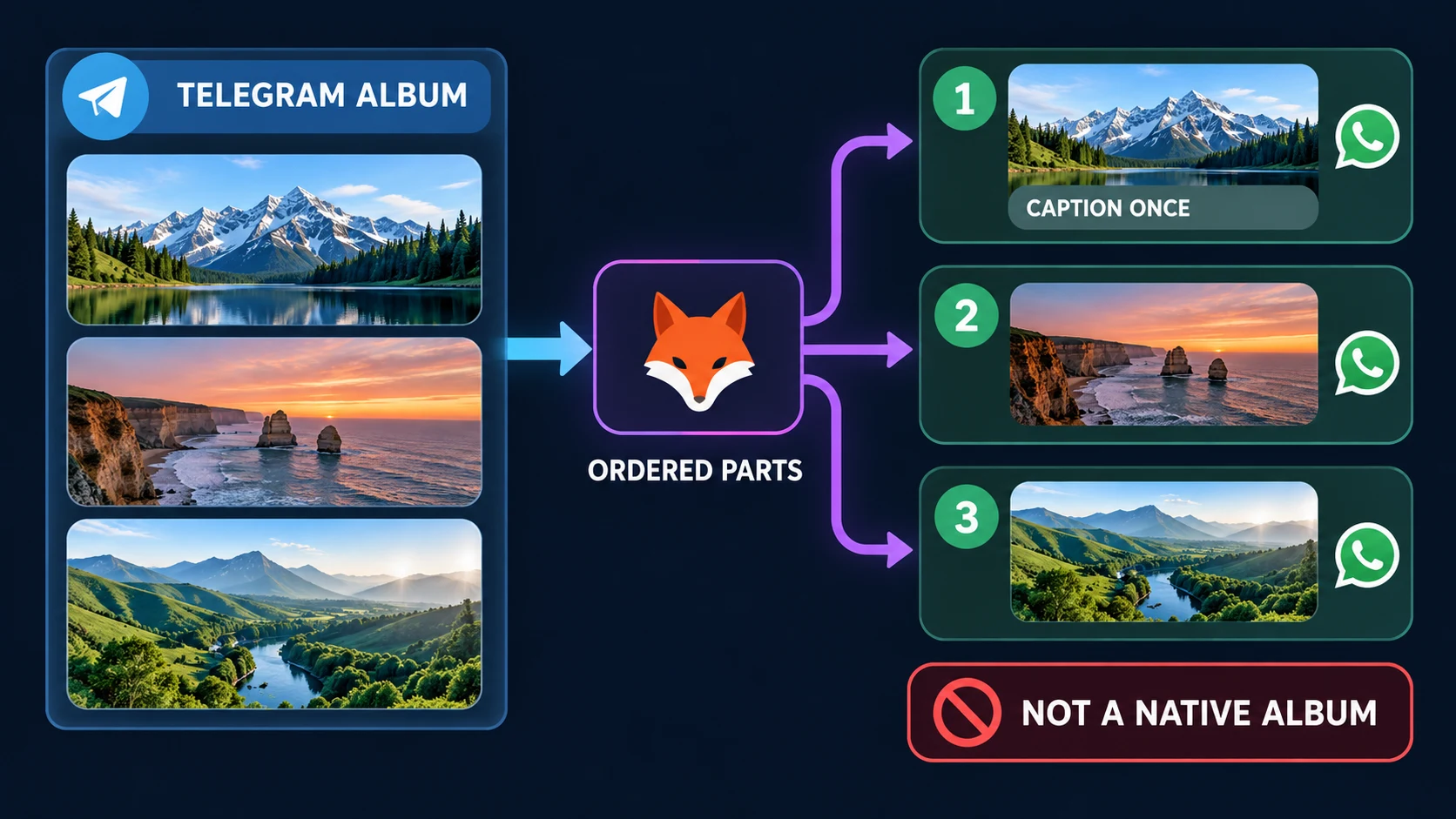
Before production, use a three-item sample with visibly different media. Record the source order, expected destination order, and the caption location. If album collection inside Telegram is the problem, use the separate Telegram Album Delivery Modes guide; it covers Fast, Balanced, Stable, and Careful collection modes without promising complete delivery.
Polls, contacts, locations, venues, dice, and games become readable equivalents
Some Telegram objects carry information that can remain useful even when the object itself is not recreated natively. The reviewed conversion layer uses bounded text representations:
- Poll: the question and options become a text summary. Do not imply that recipients can vote in an interactive WhatsApp poll created from the Telegram poll.
- Contact: contact fields become readable text. Treat phone numbers and other fields as personal data; publish only with the necessary rights and purpose.
- Location: the latitude and longitude are used to build a Google Maps link; separate coordinate text is not established by the reviewed implementation.
- Venue: the title and address are paired with a map link when coordinates are available.
- Dice: the emoji and result become readable text rather than an interactive Telegram animation.
- Game: the title and description become readable text rather than preserving gameplay or interactive state. This path is implementation-identified and covered by a focused automated test; a controlled provider readback is not established here.
This design favors informational continuity over pretending that cross-platform objects are identical. It also creates an operational duty: confirm that the text carries enough meaning for the audience and does not expose personal or location data that should not be redistributed.
What “no generic fallback” means
The reviewed generic conversion layer does not silently turn paid media, stories, or preparation-dependent rich messages into an invented text/link message. That statement is narrower than “these types can never be handled anywhere.” It means the reviewed general-purpose path does not fabricate an ambiguous substitute; a specialized preparation workflow outside that layer is not established here.
For a production route that may contain one of these objects, choose one of three safer actions:
- Exclude the content type from the route.
- Replace it upstream with an authorized ordinary post that contains the information recipients need.
- Run a dedicated staging test and seek a product-specific workflow before making a public compatibility claim.
Test each WhatsApp destination separately
The parent Telegram-to-WhatsApp setup guide covers Contact, Group, and the RedFox UI label “Newsletter,” which refers to a WhatsApp Channel destination. The media map in this article describes the reviewed publication representations; it does not establish identical behavior across all three destination types, every WhatsApp client, or every account state.
Use a destination you control for testing. A successful Contact test is useful evidence for that test, not proof of Channel behavior. Likewise, a controlled Channel readback is not a universal reliability commitment for every Group or Contact route.
How to test your exact media mix
Authorization check: Technical compatibility is not confirmation that WhatsApp authorizes this automation method. Before connecting an account, verify that the workflow and intended use comply with the current WhatsApp terms and applicable product policies. If that authorization is unclear for your account or use case, do not connect or activate the route.
- Use authorized staging chats. Do not test with customer data, paid content, private contacts, or sensitive locations.
- Build one small matrix. Include one photo, video, GIF, audio, voice message, document, sticker, three-item album, poll, contact placeholder, location placeholder, venue placeholder, dice result, and game placeholder only if those types matter to your route.
- Make every sample identifiable. Use non-sensitive labels such as SAMPLE-PHOTO-A and three visibly different album items.
- Record expected representation. Mark each item as media, converted video, ordered part, readable equivalent, or excluded.
- Create and activate the Publish Task. Follow the first-party setup guide for QR connection and task setup; its older text-only media statement is not the source for this compatibility matrix.
- Send new messages after activation. The setup workflow is for new content; do not use it as evidence of historical-message migration.
- Read back the destination. Check order, item count, caption placement, visible representation, and whether links open as expected.
- Keep a rollback. Pause or remove the staging task if the result is unsuitable. Do not keep sending retries into a live audience.
A clean staging result supports the exact sample, destination, account state, and time of observation. Keep that scope when writing an internal acceptance note or public claim.
Troubleshoot by symptom
| Symptom | First evidence-based check | Avoid claiming |
|---|---|---|
| GIF arrives as video | Expected reviewed representation; check playback | That the GIF object or original format was preserved |
| Round video note becomes ordinary video | Expected reviewed representation; check content and playback | Round-note UI parity |
| Album appears as several messages | Check sequence and single caption | Native WhatsApp album behavior |
| Poll is not interactive | Check question and options in the text summary | Cross-platform interactive poll recreation |
| Location becomes a Google Maps link | Check the map destination and consent; separate coordinate text is not established | Native or live-location behavior |
| One file does not publish as expected | Isolate the file, type, destination, and account state in staging | A universal file-size, codec, or platform limit without a current primary source |
| WhatsApp restricts or disconnects the account | Pause automation, review WhatsApp's account-restriction guidance, and do not attempt circumvention | That QR-linked automation is risk-free or officially authorized by Meta |
If even a new plain-text baseline does not arrive, stop changing media formats and use the route-level troubleshooting guide first. It separates addon, connection, task, source, destination, and rule failures from media-specific behavior.
Safety and authorization boundary
A QR-linked session is still account authorization even when the setup does not ask you to paste a WhatsApp API token. Protect the QR code and linked-device session like credentials. Connect only an account you are authorized to use, and review linked devices if access is no longer needed. This review did not establish the RedFox QR-linked workflow as an official Meta or WhatsApp Business Platform integration; do not infer official authorization or endorsement from the ability to link a session.
Access to a Telegram source does not automatically grant redistribution rights. Confirm the right to republish text, media, contact information, and location data. Follow WhatsApp's messaging guidelines, recipient expectations, and applicable consent rules. If the account is restricted, stop the route and use the official recovery process rather than evasion.
FAQ
- Can RedFox Auto Forward Telegram forward Telegram photos and videos to WhatsApp?
- The reviewed implementation has dedicated photo and video publication paths, and controlled readbacks observed those media types. Test the exact files and destination; this is not a universal codec, file-size, client, or delivery commitment.
- Does a Telegram GIF stay a GIF on WhatsApp?
- Not in the path reviewed for this guide. The Telegram animation is converted to MP4 and published through the video representation. Verify the observed playback in your target client.
- Are Telegram video notes preserved as round video notes?
- The reviewed conversion uses a video representation. Do not promise Telegram's round video-note presentation on WhatsApp.
- Does a Telegram album become a native WhatsApp album?
- No such claim is supported. The product publication layer reviewed for this guide sends ordered parts sequentially and handles the caption once.
- Can Telegram polls be recreated as interactive WhatsApp polls?
- The reviewed generic representation is a readable text summary of the question and options, not a claim of an interactive poll recreation.
- What happens to Telegram contacts and locations?
- Contacts become readable text. A location becomes a Google Maps link built from its coordinates; a venue includes its name and address plus a map link. Use only authorized, non-sensitive data.
- What happens to games, paid media, stories, and rich messages?
- A game becomes readable title-and-description text in the reviewed implementation, without preserving gameplay. Paid media, stories, and preparation-dependent rich messages do not receive an invented generic fallback in the reviewed layer; exclude them or verify a dedicated preparation workflow before relying on them.
- Why does the older RedFox setup guide say media is not forwarded?
- That public page remains useful for QR and task setup, but its older text-only wording conflicts with the later source-code review and controlled staging observations described in the evidence box above. This article labels the newer evidence and does not use the older wording as media proof.
- Do I need a Phone Number ID or access token?
- The reviewed RedFox QR workflow does not require you to paste those credentials. It still creates a linked session, so QR/session security and account authorization remain important.
Start with an authorized staging route
Use the complete Telegram-to-WhatsApp setup guide to connect an authorized account, select a source, choose a Contact, Group, or Channel destination, and create the Publish Task. If the destination is not settled, compare the interaction and privacy trade-offs in WhatsApp Contact vs Group vs Channel. Then run the smallest test matrix that covers your real content.
Review the Auto Forward Telegram product overview, open RedFox Auto Forward Telegram on the web, use the iOS app or Android app, or verify the current bot at @AutoForwardNew_Bot. Pause the route if the observed representation does not fit the destination.
Continue in the Exact RedFox Auto Forward Telegram Bot
Verify @AutoForwardNew_Bot, then use the current RedFox documentation while configuring your workflow.
Check current plans and limits in the bot