Telegram to WhatsApp Without an API Token: What It Means

Yes—for the RedFox QR-linked Telegram-to-WhatsApp flow reviewed on September 17, 2026, you do not paste a WhatsApp Phone Number ID or access token into RedFox. The account holder initiates the connection by approving a temporary QR-linking step in WhatsApp's Linked devices interface. RedFox then reports a connected session for the Publish Task.
The important correction is that “without an API token” does not mean “without authorization.” The QR code is temporary, but RedFox's reported connected state can continue after the QR disappears. In this article, linked session describes that observed connection state; it does not mean WhatsApp has certified RedFox as an officially supported linked-device client. Protect both the pairing step and the continuing connection, and disconnect it when the automation is no longer needed.
Auto-Bot.io is an independent editorial site. It does not develop or operate RedFox Auto Forward Telegram. The RedFox flow below is based on the first-party setup guide and dated implementation observations checked on September 17, 2026. Meta and WhatsApp sources are used to explain their own Cloud API and linked-device models—not to certify RedFox. Product and platform behavior can change.
What “without an API token” actually means
Keep three questions separate:
- Do I enter a Meta API token? No, not in the reviewed RedFox flow.
- Does the service still require authorization? Yes. The account holder approves a QR-linking step and RedFox reports a continuing connected session.
- Is that mechanism officially supported by WhatsApp? This article does not establish that, and WhatsApp's unofficial-linking warning is a material account-risk consideration.
In the reviewed RedFox flow, you do not create a Meta developer app or paste these Cloud API values into the product:
- a WhatsApp access token;
- a WhatsApp Phone Number ID;
- a WhatsApp Business Account ID;
- a webhook URL or verification token.
Instead, you open RedFox's WhatsApp connection screen and scan its temporary QR code from the authorized phone's WhatsApp → Linked devices → Link a device flow.
This reduces the amount of developer configuration that the operator performs. It does not remove authorization from the system. Treat the reported connection/session as sensitive, even though the operator does not copy a token string. This article does not claim how RedFox stores or encrypts session material.
The distinction matters because “API token,” “QR code,” “session,” and “no-code” describe different parts of a system:
- API token: a string used to authenticate requests to an API, such as Meta's WhatsApp Cloud API.
- QR code: the temporary pairing challenge shown during the RedFox connection flow.
- Linked session: this article's shorthand for the continuing connection state that RedFox reports after the account holder approves the QR-linking step—not a claim of WhatsApp certification.
- No-code setup: the operator configures the route through an interface rather than building the integration. It says nothing by itself about the underlying authorization model or platform status.
What it does not mean
Do not interpret “without an API token” as any of the following:
| Misinterpretation | What is accurate instead |
|---|---|
| No authorization is required | The account holder must initiate the connection by approving the QR-linking step in WhatsApp. |
| The QR code is harmless after sharing | A live QR code can authorize pairing while valid. Never publish it or send it to another person. |
| No sensitive connection exists after pairing | Treat RedFox's continuing connected session as sensitive and log it out when no longer needed. |
| The flow is the official WhatsApp Cloud API | This article does not establish that. The observed RedFox flow uses QR-linked authorization rather than user-entered Cloud API credentials. |
| No account restriction is possible | WhatsApp warns that unofficial linking may put an account at risk, including temporary or permanent bans. Platform rules, permissions and audience consent still apply. |
| Everything in Telegram will be mirrored identically | The route handles new messages; edits/deletes are not mirrored, and some content can be represented differently. Test the exact content you plan to use. |
A useful mental model is: the operator avoids entering API credentials, but the product still needs an authorized account session to act.
QR-linked session vs Meta Cloud API
Meta's current WhatsApp Cloud API quickstart is a developer/business-platform workflow. It covers a Meta app, WhatsApp Business Account resources, access tokens, a Phone Number ID, and webhooks. The reviewed RedFox path instead asks the account holder to approve a QR-linking step and then reports a connected session.
These are different setup and governance models—not interchangeable labels for the same credential.
| Decision factor | Reviewed RedFox QR-linked flow | Meta WhatsApp Cloud API |
|---|---|---|
| What the operator enters | No WhatsApp Phone Number ID or access token in the reviewed RedFox connection form | Meta's setup uses WhatsApp Business resources, Phone Number IDs and access tokens |
| How authorization starts | The account holder approves RedFox's QR-linking step in WhatsApp | A Meta app and WhatsApp Business setup authorize API calls |
| Continuing authorization | RedFox reports a connected account session; treat it as sensitive and revoke it when no longer needed | Access tokens, app permissions and related business resources |
| Who operates the automation layer | RedFox, as a third-party product, provides the interface and Publish Task service | The organization or its provider builds and governs the application/API integration |
| Official WhatsApp API architecture | Not established by this article | Yes—the Cloud API is Meta's documented WhatsApp Business Platform product |
| Main governance concern | Third-party session authorization and the account risk described in WhatsApp's unofficial-linking warning | API credentials, Meta business resources, application permissions and backend governance |
| Primary fit | A non-developer who wants a configured Telegram-source-to-WhatsApp-destination Publish Task and accepts the linked-session model | A business or developer team that specifically needs Meta's official API resources, webhooks, templates and application governance |
| Claim made here | A dated description of the RedFox product flow—not an official-platform certification | Meta's own documented WhatsApp Business Platform product |
Neither column is automatically “better.” The correct choice depends on the architecture, account governance, messaging use case, platform requirements and risk your team is prepared to manage. If official Cloud API status is a requirement, choose and validate an official Cloud API route rather than treating QR pairing as a shortcut to the same architecture.
What you still need
Removing the token-entry step does not remove the rest of the preflight. According to RedFox's product guidance for this reviewed flow, prepare:
- a RedFox Auto Forward Telegram account signed in and connected to Telegram;
- access to each Telegram chat, group, or channel you plan to monitor;
- an active External Publish addon;
- an active WhatsApp account on the primary phone used for pairing;
- permission to send to the selected WhatsApp Contact, Group, or Channel;
- a harmless source and destination for the first controlled test.
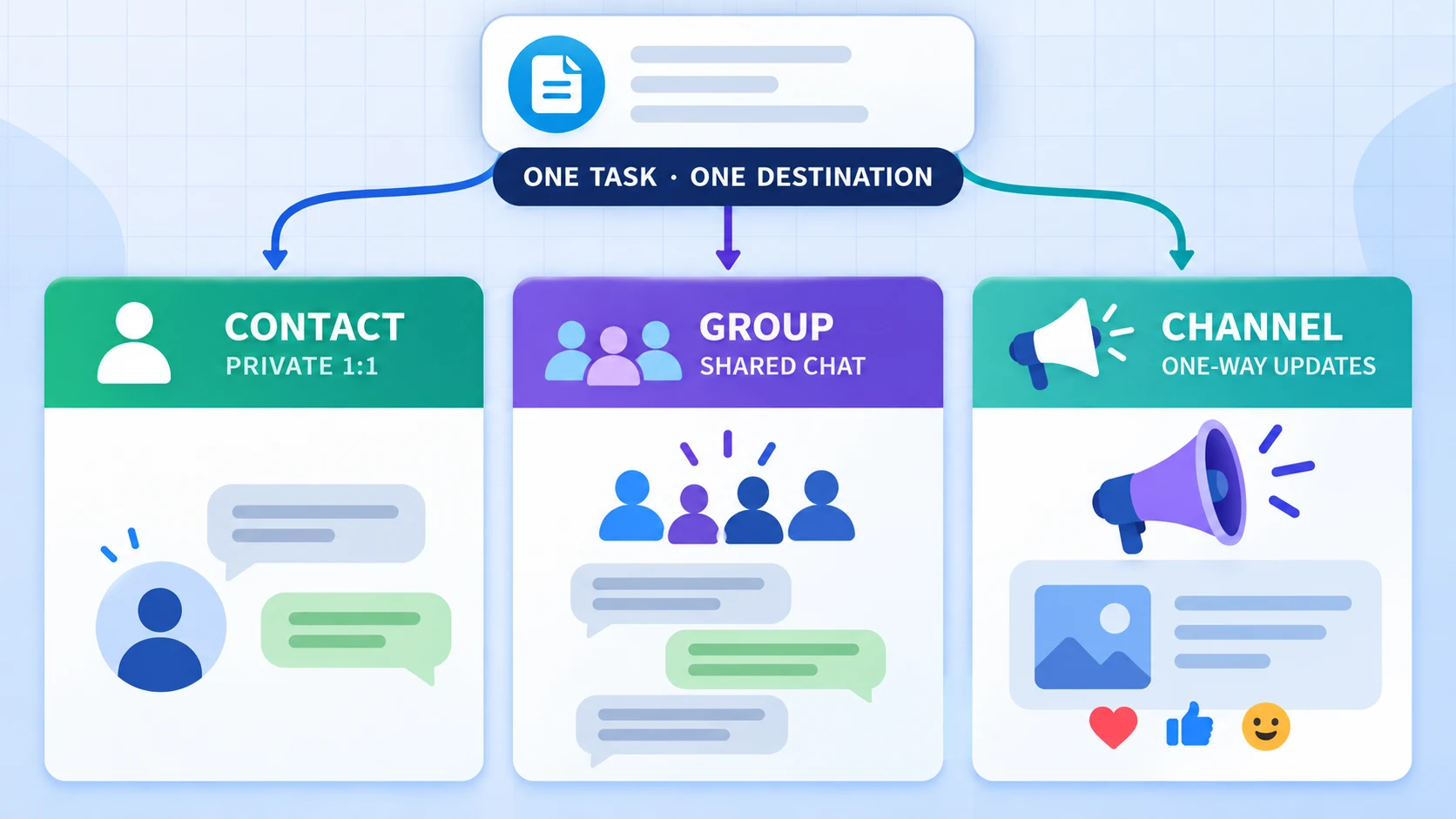
RedFox labels a WhatsApp Channel destination Newsletter. Each Publish Task stores one Contact, Group, or Newsletter destination. Use the Contact vs Group vs Channel decision guide if the audience model is not yet settled.
The task starts with new source messages after creation; it is not a history-import tool. Telegram edits and deletes are not synchronized to the WhatsApp copy. For current content representations and staging boundaries, read the supported-media matrix.
The authorization lifecycle
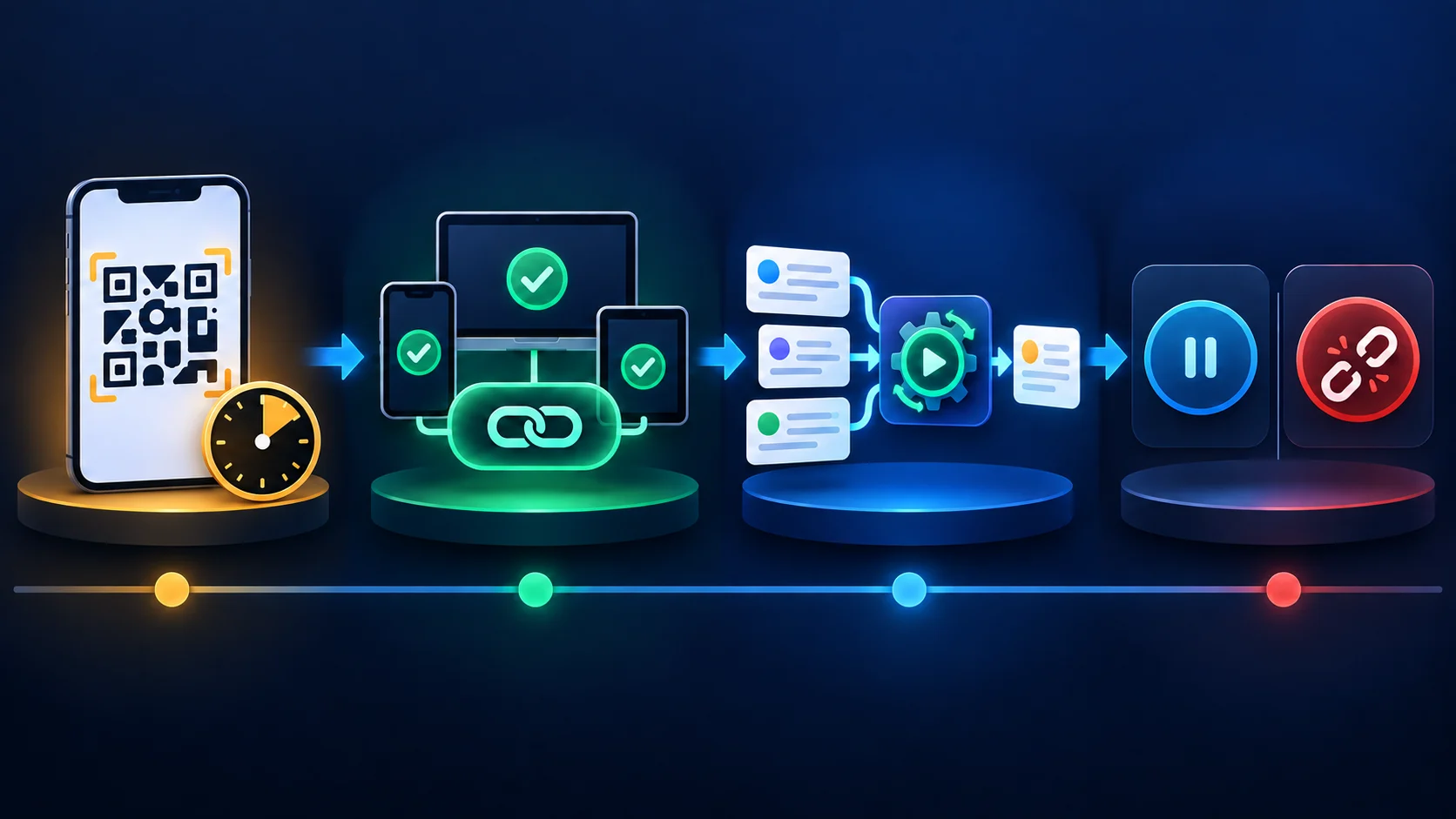
- Temporary QR: RedFox displays a pairing code. Keep the connection screen private and scan it only from the authorized primary phone.
- Connected session: after approval, RedFox reports the connection as Connected. The QR can expire or disappear while that connection remains active; this observation is not a WhatsApp certification of RedFox as a supported linked-device client.
- Publish Task: a Running task watches selected Telegram sources and sends new eligible content to one selected WhatsApp destination.
- Stop or revoke: stopping the task pauses automation; logging out the linked device removes account authorization. One action does not automatically substitute for the other.
If the session later shows Reconnect required, a fresh QR can reauthorize the saved connection. Reconnecting repairs the account-session layer; it does not fix a wrong Telegram source, WhatsApp destination, stopped task, schedule, filter or unsupported test assumption. Use the troubleshooting ladder when a configured route does not deliver.
Set up and test the route safely
- Open RedFox Auto Forward Telegram and go to Publish → Manage Accounts.
- Confirm that External Publish is active, then add or open the WhatsApp connection.
- On the authorized primary phone, open WhatsApp → Linked devices → Link a device.
- Scan the RedFox QR code privately and wait for Connected.
- Create a Publish Task, choose one or more Telegram sources, and select one WhatsApp Contact, Group, or Newsletter destination.
- Review the route and create the task. Confirm its status is Running.
- Send one new, harmless plain-text message from one exact selected Telegram source.
- Verify that the message appears once in the intended WhatsApp destination.
Do not use an old Telegram post as the baseline because the route is new-messages-only. Do not begin with customer data, private community content, trading instructions, a large media file or a broad production audience. Once plain text works, add one content type at a time and record the result without inferring universal reliability from one sample.
The full menu-by-menu sequence is in the Telegram-to-WhatsApp setup guide. This article owns the credential and authorization decision; the parent guide owns the complete setup walkthrough.
When this flow fits—and when it does not
The reviewed RedFox route may fit when
- the operator wants a no-code product interface rather than building API calls and webhooks;
- the route is one-way from selected Telegram sources to one WhatsApp destination per task;
- the account holder understands and accepts third-party session authorization and WhatsApp's unofficial-linking warning;
- the workflow can begin with a controlled destination and exact content tests;
- the operator will monitor connection state, permissions, audience consent and platform rules.
Choose and validate another architecture when
- your organization specifically requires the official WhatsApp Business Platform or Cloud API;
- you need Meta-managed business resources, templates, webhooks or application permissions as architectural requirements;
- your security team prohibits third-party linked sessions or requires centralized token rotation and audit controls;
- you need historical migration, two-way synchronization, mirrored edits/deletes, or an identical native representation for every Telegram object;
- you cannot accept the account risk described in WhatsApp's unofficial-linking warning.
Choosing another architecture is not a failure of setup. It is the correct outcome when the authorization model does not satisfy the team's requirements.
Security, revocation and restrictions
- Protect pairing: never expose a live QR in an article, support ticket, public chat, screen recording or shared document.
- Protect the session: review WhatsApp Linked devices regularly and log out devices or sessions you do not recognize.
- Use minimum scope: connect only an account you are authorized to use and select only necessary Telegram sources and WhatsApp destinations.
- Respect consent and rights: source access does not automatically grant the right to redistribute content to another audience.
- Avoid abuse: WhatsApp's Messaging Guidelines prohibit spam, repeated unwanted contact and harmful automation. Do not use this route to evade restrictions or send content without permission.
If WhatsApp reports that the account is restricted or banned, stop the Publish Task and remove the linked session. Do not repeatedly reconnect or rotate accounts to continue the same behavior. WhatsApp says an in-app Request review may be available for some bans and that third parties cannot remove a ban; follow the official account-ban process.
Frequently asked questions
- Can I forward Telegram to WhatsApp without a Meta API token?
- Yes in the reviewed RedFox QR-linked flow: you do not paste a WhatsApp Phone Number ID or access token into RedFox. The account holder approves a temporary QR-linking step and RedFox then reports a continuing connected session. This answer applies to that product flow, not every Telegram-to-WhatsApp integration.
- Does no API token mean no login or authorization?
- No. Approving the QR-linking step initiates authorization. RedFox's reported connected session can remain active after the QR expires and should be treated as sensitive.
- Is the RedFox QR flow the official WhatsApp Cloud API?
- This article does not establish that. Meta's Cloud API documentation describes Meta apps, WhatsApp Business resources, access tokens, Phone Number IDs and webhooks. The reviewed RedFox flow uses a QR-linking step and a RedFox-reported connected session instead; WhatsApp's unofficial-linking warning remains relevant.
- Do I still need the External Publish addon?
- Yes. The first-party RedFox setup guide lists an active External Publish addon as a prerequisite. A connected WhatsApp session and an active addon are separate checks.
- What happens when the QR code expires?
- If pairing has not completed, use Retry or Reconnect to display a fresh QR. If the session had already connected, the expired image alone does not revoke the linked session. Review the connection status and WhatsApp Linked devices.
- How do I revoke access?
- Stop the RedFox Publish Task to pause automation, then log out the relevant device/session from WhatsApp Linked devices when you want to remove account authorization. Verify both states rather than assuming one action completes the other.
- Will the route forward old Telegram history?
- No automatic history import is established here. The reviewed flow handles new messages after the task is created and running. Test with a new disposable message.
Start with a controlled route
Before connecting, decide whether a QR-linked session satisfies your account-governance requirements. If it does, use a harmless source and destination, confirm one new plain-text message, and expand only after the result is understood.
Open the current product: review the RedFox Auto Forward Telegram product page, use @AutoForwardNew_Bot, or continue in the Web app, iOS app, or Android app.
Use Web, iOS or Android for the fuller management interface. According to RedFox product guidance, an active task runs in RedFox's cloud without keeping the management screen open; the linked session and task still need to remain valid. This statement does not measure or establish latency, delivery rate or uptime.
Continue in the Exact RedFox Auto Forward Telegram Bot
Verify @AutoForwardNew_Bot, then use the current RedFox documentation while configuring your workflow.
Check current plans and limits in the bot