Send Telegram Updates to Spanish and Vietnamese Channels
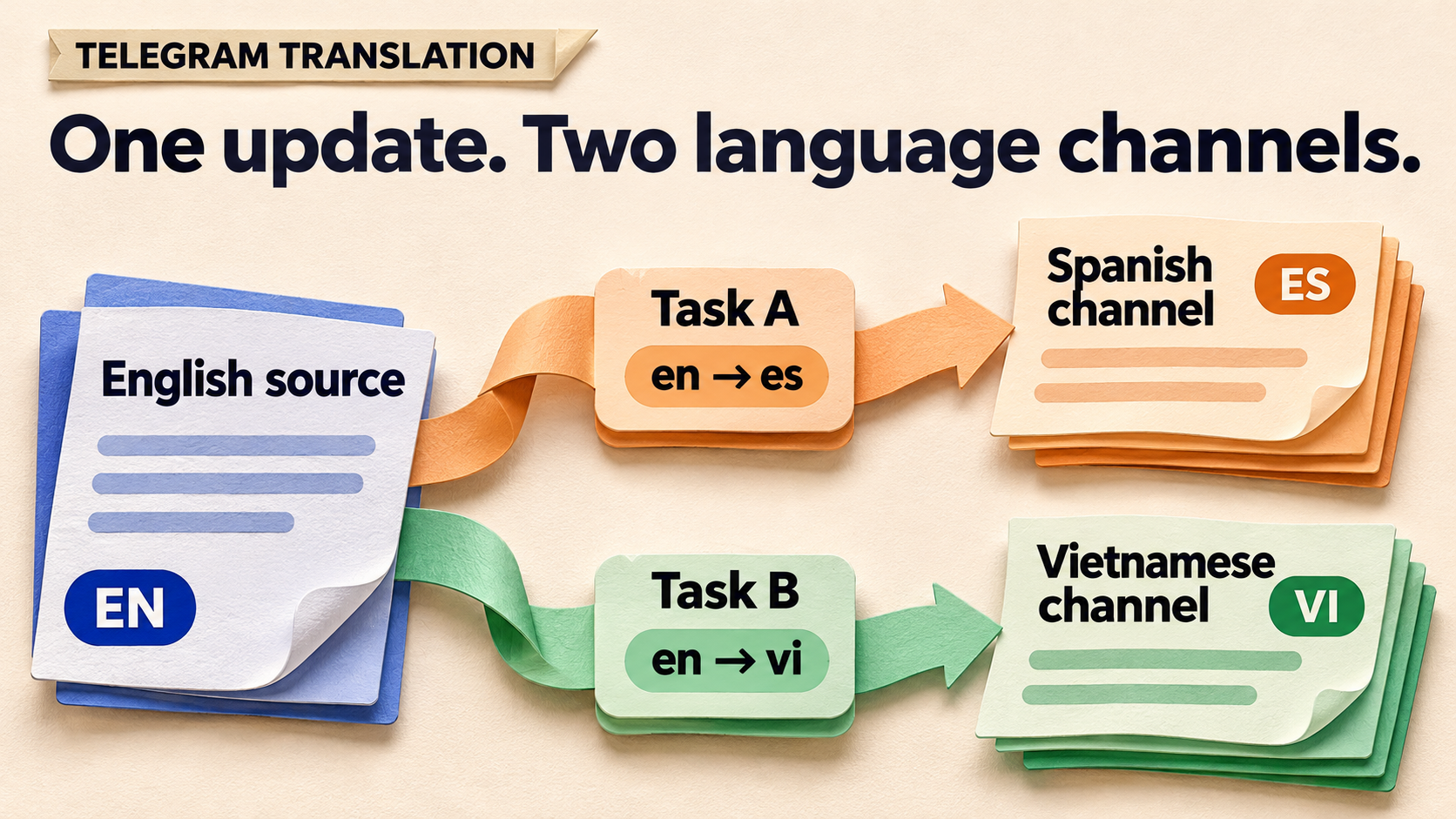
Publish your product update once in English, then give Spanish-speaking and Vietnamese-speaking members their own channel copies. In RedFox Auto Forward Telegram, build two separate forwarding tasks from the same approved source: English en → Spanish es on one task, and English en → Vietnamese vi on the other. Keep each task pointed at its own language channel, with Show Header Forwarder off so translation can work.
This is a route-design guide for a product team with one English Telegram announcement channel and two regional member channels. It gives you a route sheet, a worked update in three languages, cross-route checks and a moderator handoff. RedFox develops the product; Auto-Bot.io publishes this guide. The Translate Language documentation and task guides were checked November 5, 2026.
One source, two tasks, two language channels
The useful change is not making every member translate the English announcement themselves. It is maintaining a channel where their language is the normal reading experience, without asking your team to copy and translate every routine update by hand.
RedFox documents translation as a source-to-target setting for a forwarding task. The language list includes en, es, vi and auto for source-language detection. For this consistently English source, select en deliberately on both tasks. That records the input you expect; it is not a promise that every translation will be correct.
Use the following route sheet. The task labels are examples; replace the channel names with your own exact destinations.
| Task label | Translation | Only target |
|---|---|---|
news_es | English → Spanishen → es | Spanish members |
news_vi | English → Vietnameseen → vi | Vietnamese members |
- Both sources: the same approved English product-update channel.
- Both native-header settings: Show Header Forwarder off.
- No cross-feed: neither member channel is a source for the other route. Each translation starts from the English original, not a translation of a translation.
- The original remains your reference: compare both destination copies with that English announcement when checking a release.
This design assigns one language pair to each task. It does not depend on a language selector for each target inside a shared task, and it does not create a Spanish-and-Vietnamese combined post. If your members want both languages in the same message, that is a different publishing requirement.
Telegram also has a reader-side message translation feature, described in its December 2021 announcement as a Translate action in the message menu. That helps a reader understand an existing post. Here, the job is different: deliver separate language-channel posts through your own forwarding routes.
Prepare the routes before audience traffic
Start with content and chats you control or are authorized to republish. The connected account must be able to access the source and the chosen sender must be allowed to post in each target. Use an approved-announcements source, not a staff discussion where draft dates, private customer details or speculative release notes can slip through.
Check that your account currently offers Translate Language and enough task capacity for these two routes. Do not infer translation access from a general Free, trial or paid-plan label. This guide does not assume a particular entitlement or unlimited tasks.
Creation is not a harmless draft stage. RedFox’s task creation guide says a newly created task is activated. First rehearse with an operator-controlled source and two private, operator-only targets. Keep that source quiet while you create and configure the tasks; pause newly created tasks while finishing settings if needed. Do not attach an active news stream to a member channel and assume you can finish translation afterward.
Before any audience-facing launch, agree on attribution. The translation guide says Translate will not work when Show Header Forwarder is on. This is Telegram’s native “Forwarded from” attribution, not an ordinary source line you type yourself. If native attribution is mandatory for your content, settle a permitted translated-copy policy before proceeding; do not silently remove the requirement.
Configure each language on its own task
Use the official Web app, iOS app or Android app, whichever you prefer. Web and the apps provide fuller management and feature access than the limited Telegram-bot entrypoint. The current bot is @AutoForwardNew_Bot; check that exact username.
- Create the Spanish rehearsal route. In Forwarding List, choose Create Task, select the controlled English source, then only the private Spanish target. Give it a recognizable label such as
news_es. Read the selected source and target again before creating it. - Open that specific task’s settings. In Web or the app, return to Forwarding List and open the task you just created to manage its settings. Find Translate Language and Show Header Forwarder there; the exact navigation can differ by interface. RedFox’s task-settings guide documents the bot alternative: use
/settingsor/forward, then Manage Forwarding Tasks or Show ALL, select the task and open Advanced Configuration. - Set the Spanish language pair. On
news_es, select Englishenas source and Spanishesas target. Turn Show Header Forwarder off. Complete the save or confirmation shown by your interface, then reopen the same task and read back the pair and header state. - Create and configure the Vietnamese route separately. Select the same controlled English source, only the private Vietnamese target, and a distinct label such as
news_vi. Set Englishen→ Vietnamesevi, with Show Header Forwarder off. Save and reopen this task too. - Compare the two saved tasks side by side. Their source should match; their destination and target-language code should differ. Record relevant filters, delay and task status. When ready to check fresh posts, enable only the intended controlled routes and leave unrelated tasks alone.
Keep this first pass narrow: ordinary text announcements, without adding AI rewriting, OCR, new replacement rules or a scheduler at the same time. You are checking a language split, not proving every content transformation works together. If you later add photo captions or other message forms, check those actual forms separately.
A worked product update: preserve the decision, not the sentence shape
Use a harmless update with a status, a negative instruction, an explicit timezone and a link. The following fictional specimen is suitable for operator-only rehearsal. The Spanish and Vietnamese versions are editorial meaning references, not captured RedFox output or promised wording.
English source specimen
Update 42: Search export is postponed. Do not enable it yet. On 12 November at 14:00 UTC, we will confirm the new launch date. Existing exports are not affected. Details: https://example.com/updates/42
Spanish meaning reference
Actualización 42: Se pospone la exportación de búsquedas. No la actives todavía. El 12 de noviembre a las 14:00 UTC confirmaremos la nueva fecha de lanzamiento. Las exportaciones existentes no se ven afectadas. Detalles: https://example.com/updates/42
Vietnamese meaning reference
Cập nhật 42: Tính năng xuất kết quả tìm kiếm bị hoãn. Tạm thời đừng bật tính năng này. Vào 14:00 UTC ngày 12 tháng 11, chúng tôi sẽ xác nhận ngày ra mắt mới. Các bản xuất đã có không bị ảnh hưởng. Chi tiết: https://example.com/updates/42
The most consequential detail is what 12 November at 14:00 UTC describes: the team will confirm a new launch date then. It is not the launch itself. Both copies must also keep “postponed,” “do not enable it yet” and “existing exports are not affected.” Fluent wording that reverses any of those decisions is not ready for members.
Ask a capable speaker of each language to assess natural wording and your product terminology. Keep a small team-owned glossary of preferred terms, but treat it as a review aid: this workflow does not assume RedFox automatically imports or enforces a glossary. Names, numbers and URLs are items to compare in the actual output, not preservation guarantees.
Check the pair of routes, not just two translated sentences
Post the English specimen as a fresh message in the controlled source, then wait through each task’s configured delay. Record the source reference, saved task pair, actual destination text and arrival time.
- Both intended destinations receive a copy. Open the Spanish and Vietnamese targets separately. A Spanish success does not establish that the Vietnamese route delivered.
- The languages do not cross. Spanish prose belongs in the Spanish channel; Vietnamese prose belongs in the Vietnamese channel. Compare the task’s exact target and saved language code if either is wrong.
- The meaning survives independently. Compare each version with the English original, not only with the other translated version. Check the postponed status, prohibition, confirmation-versus-launch distinction, 42, date, time, UTC and full URL.
- No extra route sends an extra copy. Look for an older untranslated task or a second translation task targeting either channel. For this rehearsal, the expected result is one copy in each target from the two intended tasks. An extra copy is a route-ownership problem to investigate, not evidence that the translator repeated itself.
- A second fresh update follows the same map. Use different harmless wording, for example: “Update 43: The export remains disabled. The next status update is at 16:30 UTC. No action is required.” Both languages must retain “disabled” and “no action.” New text helps avoid confusing a duplicate-filter exclusion with failed delivery.
Separate missing delivery from unchanged language. If a copy never arrives, check that task’s status, source/target, delay and eligibility rules first. If ordinary English prose arrives unchanged, reopen the same task and confirm its language pair and native-header state; also check that Translate Language is still available on your account. Our translation and forward-header troubleshooting guide covers that symptom in depth. If the language changes but the meaning is wrong, hold the affected route for language review rather than toggling unrelated delivery settings.
Do not assume translation rewrites old member-channel posts or that a later source edit will correct both outputs in the required way. Check edit behavior separately if your operation depends on it. For an important correction, prepare an explicit new correction announcement and verify both language copies.
Hand off a route sheet your next moderator can use
After the controlled checks are acceptable, prepare the audience-facing tasks during a quiet publishing window. Record the real selections and review them before new source traffic begins; do not assume a rehearsal result certifies different live targets. Because task creation activates forwarding, keep the approved source quiet and pause newly created tasks while applying and reading back their language settings. Check the first authorized live update in both member channels.
Keep one private operations note with these fields:
- Source owner: who approves English updates before posting, plus the exact source reference.
- Spanish route: task reference, exact target,
en → es, header-off state and Spanish-language reviewer. - Vietnamese route: task reference, exact target,
en → vi, header-off state and Vietnamese-language reviewer. - Delivery controls: relevant filters and delay, other tasks that could reach either target, and the latest accepted example in each channel.
- Correction owner: who can pause an affected task, approve a corrected announcement and verify the destination result.
Automation does not create an approval queue. If a release needs language approval before members see it, use operator-only destination channels for review and publish approved versions through a separate editorial step. Do not treat a moderator spot-check after delivery as prepublication approval.
When one route has a problem, preserve its saved settings and actual output before changing anything. Pause the affected route if necessary, check the other route rather than assuming it failed too, and agree on the member-facing correction. Pausing is not proof that queued work was cleared or that missed posts will replay on restart. RedFox’s runtime FAQ says it copies messages without keeping your internet on; active tasks run in RedFox’s cloud, so closing the management screen is not your stop control.
Frequently asked questions
Why use two tasks instead of adding both targets to one?
This procedure binds a different source-to-target language pair to each task. Separate tasks make the intended language and destination explicit and give moderators a clear place to inspect or pause one route. It does not assume per-target language overrides inside a shared task.
Should the source language be auto?
For this known English source, use en. RedFox lists auto for detection, but a mixed-language source is a different case to check with representative posts. Auto-detection does not choose whether your Spanish or Vietnamese members should receive the message; the task’s target language does.
Do I need Smart AI Rewrite as well?
Not for the route design here. Start with the documented Translate Language setting. If your separate problem is inconsistent announcement structure, see Smart AI Rewrite for member updates; do not add that extra transformation to this rehearsal without checking its own requirements and results.
Give each member channel its own language route
Explore RedFox Auto Forward Telegram, then set up the two controlled routes before connecting audience traffic. Your launch criterion is concrete: the same English update produces a Spanish copy in the Spanish target and a Vietnamese copy in the Vietnamese target, with the same facts and no unintended extra copies. For wider terminology and editorial planning, use the multilingual forwarding overview.
One Update. A Route for Each Language.
Build separate language routes for your approved Telegram updates, then check each destination before audience traffic.
Check Translate Language access on your account