Extract Structured JSON from Dynamic Pages with CamoFox

Quick answer: CamoFox Browser can extract deterministic JSON from a rendered page using CSS selectors and a structured schema. Wait for the data you actually need, scope the selectors to that page, and mark indispensable fields as required. A missing required field should stop the extraction; an optional missing value should remain unknown, not become an invented price or availability claim.
This guide is for developers and catalog operators reading their own or permitted pages. The goal is not merely a JSON-shaped answer. It is an output you can compare with the source, recognize as incomplete, and safely use in the next step.
Controlled validation: we executed the exact schema below through CamoFox Browser on an owned synthetic catalog. An early observation returned no products; after the catalog rendered, extraction returned the two expected records. Required-field failure, invalid schema and optional missing values were also exercised. This is a local fixture demonstration, not a commercial scraping benchmark or proof of access to another site's data.
Why a loaded page is not the same as a complete catalog
A listing page can finish its initial navigation before its product cards appear. A filter may replace the entire list. A missing price can mean an unloaded field, a changed selector, restricted access or a genuinely absent value. Those cases are not interchangeable.
A CamoFox MCP targeting discussion illustrates why element references alone are not always enough; it is a resolved improvement thread, not evidence of a current universal defect. A separate Playwright MCP issue describes an oversized snapshot interrupting a task. Neither thread establishes a market-wide catalog demand or a CamoFox performance advantage. They motivate a narrower practical question: how do we read the right fields without treating incomplete observation as success?
Choose a data contract before choosing selectors
For a small permitted catalog, decide what one record means. A sensible first contract is:
| Field | Source | Why keep it | Missing-field decision |
|---|---|---|---|
| Product name | Visible name within each card. | Identifies the item. | Required: a nameless row cannot be reconciled reliably. |
| Product URL | The card's product link. | Lets someone inspect the original. | Required for this example. |
| Displayed price text | The card's price element. | Preserves the source's wording/currency. | Optional: absent is unknown, not zero. |
| Availability text | The card's status element. | Captures what the page actually says. | Optional: absent is not “sold out”. |
| Capture time | Your workflow clock. | Distinguishes one observation from another. | Add outside DOM extraction. |
Text extraction does not normalize currencies, compute numeric prices or establish that stock information remains current. If you need those transformations, define and validate them separately. Keep the original text alongside any derived value.
Start with a page you control
The selector convention below is an illustrative page contract: the catalog contains .product cards, with .name, a.product-link, .price and .availability inside each card. Your real page may use different markup. Inspect it rather than copying these selectors unchanged.
<article class="product">
  <h2 class="name">Example lamp</h2>
  <a class="product-link" href="/products/example-lamp">View item</a>
  <p class="price">Price shown by the source</p>
  <p class="availability">Availability shown by the source</p>
</article>
This is sample markup, not a captured listing or claim about a real product. To test missing fields safely, remove one optional element on your own fixture. To test a required-field failure, remove the name or change its selector on that fixture. Do not modify another site's data to create an example.
Wait, observe, then extract
- Create an owned task tab. Keep its
userIdand returnedtabId. If you need setup help, use our Browser-versus-MCP setup guide rather than starting with extraction errors. - Navigate and inspect the resolved page. Make sure you did not land on a sign-in, denial or unrelated redirect.
- Wait for the catalog's readiness condition. A known heading, loaded-card marker or other application-specific state is stronger than an arbitrary long sleep. A generic page-ready signal alone is not proof that asynchronous business data has arrived.
- Take a fresh observation after a filter or navigation. Old element refs refer to an older observation. If refs do not identify the target, inspect the relevant DOM/selector rather than repeatedly clicking stale refs.
- Extract a small sample first. Compare it with the visible source before expanding to the whole permitted list.
When using an MCP client, the refs-versus-selectors guide and observation tools document this fallback. Use the browser only where rendered observation is needed; a supported catalog API may be simpler.
A structured extraction request you can adapt
Send the following JSON to POST /tabs/<tabId>/extract-structured on your approved CamoFox Browser service. Replace catalog-demo with the user that owns the tab and replace the selectors with your inspected page contract. Use the authentication required by your deployment; do not embed actual API credentials in this example.
{
  "userId": "catalog-demo",
  "schema": {
    "kind": "object",
    "fields": {
      "products": {
        "kind": "list",
        "selector": ".product",
        "item": {
          "kind": "object",
          "fields": {
            "name": {
              "kind": "text",
              "selector": ".name",
              "required": true,
              "trim": true
            },
            "url": {
              "kind": "url",
              "selector": "a.product-link",
              "attr": "href",
              "required": true
            },
            "price_text": {
              "kind": "text",
              "selector": ".price",
              "trim": true
            },
            "availability_text": {
              "kind": "text",
              "selector": ".availability",
              "trim": true
            }
          }
        }
      }
    }
  }
}
The official schema reference defines CSS-selector extraction without arbitrary JavaScript or AI interpretation. The browser reads the selected DOM fields; a language model is not asked to guess a record.
The documented success response is an envelope containing ok, data and metadata, rather than bare product rows. For this schema, read the records under data.products only after checking success. Metadata includes extractionTimeMs and matchedRoots; preserve the source URL and capture time separately. A successful envelope still needs the business completeness checks below.
Map one permitted page to this documented schema contract and inspect a few records before automating downstream work.
Handle missing data at two levels
From a rendered fixture to an actual captured response
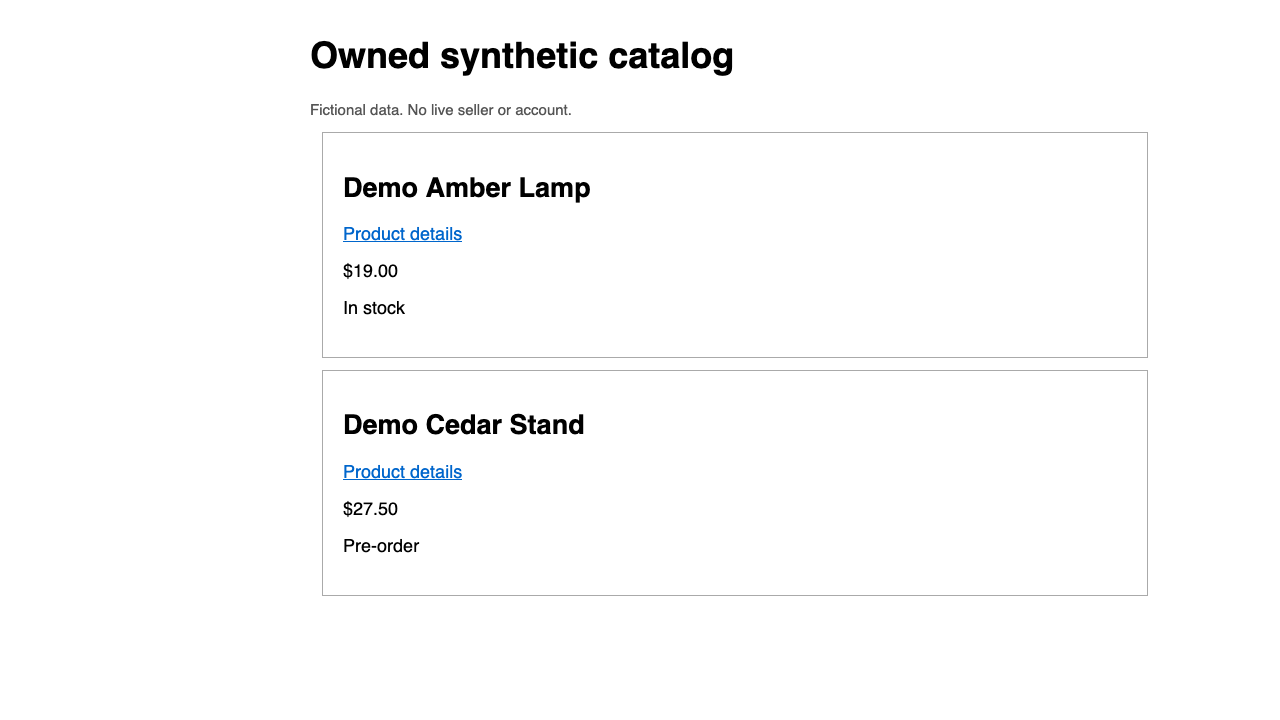
The following is the actual captured data.products array from the request above. The URLs were allocated to a temporary loopback fixture during that run; they are historical observations, not live product links or addresses to copy into your own workflow.
[
  {
    "name": "Demo Amber Lamp",
    "url": "http://127.0.0.1:53772/products/amber",
    "price_text": "$19.00",
    "availability_text": "In stock"
  },
  {
    "name": "Demo Cedar Stand",
    "url": "http://127.0.0.1:53772/products/cedar",
    "price_text": "$27.50",
    "availability_text": "Pre-order"
  }
]
When we changed only the optional price selector to .missing-price on that same controlled page, both price_text values became null, not zero. When we changed the required name selector to .missing-required-name, the real request returned HTTP 422:
{
  "ok": false,
  "error": "Structured extraction failed",
  "fieldPath": "data.products[0].name",
  "reason": "required"
}
These are selector-miss tests, not a claim that the visible products lacked names or prices. A separate invalid-root schema returned HTTP 400. The observed early-empty/later-two result is why readiness and business completeness must sit alongside the JSON schema.
| Case | Documented extraction behavior | Workflow decision |
|---|---|---|
| The schema itself is invalid. | HTTP 400. | Fix the request/schema. Waiting longer for the page will not fix its definition. |
| A required field misses at runtime. | HTTP 422; failure identifies a fieldPath. | Inspect the field path, page state and selector. Do not emit a supposedly complete dataset. |
| An optional scalar is absent. | null. | Preserve unknown. Do not replace it with a guessed price/status. |
| An optional object is absent. | null. | Do not populate a fictional nested object. |
| An optional list has no matches. | []. | Check whether an empty list is acceptable for this business task. |
Important: requiring a name inside a list does not by itself prove that at least one product exists. If no cards are matched, there may be no items in which to evaluate that required child field. Add a downstream completeness rule: if this task expects a nonempty catalog, an empty result must trigger inspection rather than a “zero products” business conclusion.
Similarly, a syntactically valid JSON result is not a validated catalog. Check that links point to the intended product, text matches the page, the page/filter is the one requested, and all required pages of a paginated listing were actually inspected.
A small failure test is more valuable than a large happy-path scrape
On your controlled fixture, exercise these cases:
- Delayed cards: navigation succeeds while the list is still empty. Wait for the actual catalog state and compare the later extraction.
- Optional price removed: retain a missing value; do not convert it to free or zero.
- Required name removed: verify the required-field error and recorded field path.
- Selector changed: inspect fresh DOM, repair only the authorized mapping, and retry once within a bounded read-only task.
- Empty or longer list: check completeness and pagination rather than accepting the first visible cards as the entire dataset.
- Access denied: preserve an unavailable outcome and stop. Extraction capability is not permission to bypass the source's controls.
Keep raw observations and downstream validation separate. JSON-to-CSV conversion, comparing two captures and scheduling alerts are additional workflow code. A single successful extraction does not mean CamoFox provides a complete price-monitoring service.
When Browser, MCP or a direct API makes sense
CamoFox Browser is the browser-service layer for this deterministic extraction. Add the separate MCP companion only when a compatible AI client is part of the workflow.
Use Browser REST/CLI when you want deterministic fields in a script or workflow. Use the extract_structured MCP tool when a compatible AI client is coordinating the same documented schema. Use a supported source API or plain HTTP when it already returns the required permitted data. Keep an existing Playwright script if it satisfies the task with less change.
Our MCP architecture guide explains the two layers. Browser extraction and an assistant's analysis are different steps; neither a tool name nor a generated summary proves completeness.
Method and scope
Auto-Bot.io publishes this guide using redf0x1/camofox-browser and its separate redf0x1/camofox-mcp companion. On 5 October 2026, the exact article schema and missing-field cases ran through unpatched Browser v2.4.8 (Preview), commit 4f23dcf30dc0a1fb20b1a94fd6035a000a31a8bd, camoufox-js 0.8.5, Node 22.22.2 and isolated official Camoufox 135.0.1 beta.24. Its age/security was not assessed; the engine was used only against controlled loopback fixtures, not recommended as a production downgrade.
The original 156.0.1 beta.34 engine pair failed before tab creation with Unknown property navigator.product in config; that negative evidence remains separate. Test your own approved Browser/engine combination before operational use. The sample markup is illustrative, while the labeled response and page capture are genuine synthetic observations—not a commercial dataset. MCP-client execution, pagination across a real seller's site and monitoring/CSV/alert workflows were not tested. The catalog use case remains an editorial synthesis, not measured market demand, a comparative benchmark or universal access claim.
Test Your Data Contract with CamoFox Browser
Review the current Browser setup, then validate readiness, required fields and pagination on a source you are authorized to access.
A successful extraction does not prove complete source coverage